skip to main | skip to sidebar

All Things Tech By Joe Knaggs

Pages

  • Home
  • YouTube

Thursday, 19 April 2012

Windows 8 Boot to desktop automatically


Unlike previous versions of Windows where you are taken to desktop at system startup, Windows 8welcomes you with Metro Start Screen, providing quick access to applications and system shortcuts, pinned programs, and so on. Apparently, Windows 8 doesn’t allow users to bring the classic Windows Startup behavior back. If you don’t want to click the Desktop metro tile every time after logging into Windows, here’s how to bypass Metro Start Screen and jump to desktop directly.
The first method of bypassing Start Screen at Windows 8 startup requires creating a Show Desktopshortcut in Startup folder. First off, open the Startup folder.
C:\Users\\AppData\Roaming\Microsoft\Windows\Start Menu\Programs\Startup
Now, select Shortcut option from New right-click context menu and enter the following Show Desktop shortcut command.
C:\Windows\explorer.exe shell:::{3080F90D-D7AD-11D9-BD98-0000947B0257}
Once done, give shortcut an appropriate name and click Finish to end the wizard. Now all you need is to restart or log off your PC to check if it takes you directly to the desktop at startup. This shortcut method is a bit slow, as Windows runs scripts, shortcuts, applications etc., in Startup folder after loading all user and system components.


If you want to speed up the process, you can bind the Show Desktop script withWindows Logon event in order to run the script as soon as you log into Windows.
You could use the Group Local Policy editor to create a Logon script or Event Viewer to manually associate the Show Desktop script with Windows Logon event. To get started, copy the aforementioned Show Desktopcommand, open Search from Charms Bar (Win+C) and click Settings. Now enter event viewer in search bar to open View event logs dialog.
view event logs 1
In Event Viewer, expand Windows Logs list from main navigation bar and then select Application. Now select Winlogon from Source column in main window, and right-click it to select Attach Task To This Event option.
attach 2
In Create Basic Task Wizard, move to Action tab by clicking Next. The Action tab lets you start a program, send an email or display a message when the associated event occurs. Just select Start a program and hit Next. Now paste the Show Desktop command to add both main executable file (explorer.exe) and command argument.
add script
Once done, close the wizard and open Task Scheduler from Search sidebar to verify the trigger and action associated with winlogon event. Now when Windows 8 starts up, it will take you directly to Desktopinstead of showing the Metro Start Screen.
Posted by Joe Knaggs at 21:54 0 comments Email ThisBlogThis!Share to XShare to FacebookShare to Pinterest
Labels: guide, Microsoft, tutorial, windows 8

Monday, 2 April 2012

Internet Explorer claws back a bit of market share at the expense of Chrome and Firefox


Image
It may have been on a steady decline for years (albeit still the number one web browser all along), but it looks like Internet Explorer has now once again found itself on a bit of an upswing. According to the latest numbers from Net Applications, IE (all versions included) gained a full percentage point in the past month (following a similar gain in January) to sit at a market share of 53.83 percent, its highest level since September of 2011. That growth came largely at the expense of Firefox and Chrome, which each dropped less than a percentage point to 20.55 and 18.57 percent, respectively (Safari and Opera also saw slight declines). As others have noted, Net Applications did recently tweak its method for measuring browser usage, although it's not clear if that alone accounts for the shift in IE's favor -- perhaps the new ad campaign is working? You can find the full breakdown at the source link below.
Posted by Joe Knaggs at 22:48 0 comments Email ThisBlogThis!Share to XShare to FacebookShare to Pinterest
Labels: Chrome, Google, Internet Explorer, Microsoft

April Fools 2012:Every (Tech-Related) Joke On The Internets


Happy April 1st, Everybody! It’s that very special time of year — the day when tech companies break out their clown shoes to make their annual attempt at being funny. As a public service, we’ve rounded up every tech-related April Fools joke that we could find, and we’ve even separated the wheat from the chaff — highlighting the stuff that’s actually funny. The LOLs, the FAILs, the ROFLs, the WTFs. Just for you. We’ll update this throughout the day, and if we missed any, feel free to link to them in the comments.
(By the way, if you’re one of those folks who finds April Fools super-stressful because you’re constantly being punked, rest assured that TechCrunch would never do that to you.)

THE BEST

Google Maps — “We’ve long neglected one of the most popular computer systems ever sold, and I’m proud to announce Google Maps 8-bit version as our first product for NES.” The best part? Google didn’t satisfy itself with a blog post and video. The team actually built the damn thing, and it’s kind of gorgeous.
Warby Parker — ”It doesn’t make sense to spend several hundred dollars on something your dog’s just going to eat.” So says Warby Parker co-founder Dave Gilboa, but that didn’t stop designer eyeglass startup from launching its own dog-focused spinoff, Warby Barker. In conclusion, OH MY GOD THAT PUG IS WEARING A MONOCLE.
Smashwords — The ebook distributor announced a new service for its writers, called Smashwords WEED. And even though WEED supposedly stands for “Writers Earn Extra Dispensation”, you can probably guess what it really means. Founder Mark Coker says, “Our mission at Smashwords is to make writers euphoric.”
Google Racing — You thought autonomous cars were cool? Well, you know what’s a lot cooler? Autonomous NASCARs. Google and NASCAR have teamed up for a partnership that takes Google’s self-driving car project to the next level. Check it out. Sergey is the new Jeff Gordon.
Hulu — Apparently, the “Voice of Hulu” had a rough recording day recently and somehow his outtakes snuck into some of the ad reels. (Link below.) Totally coincidental this happened on April Fools. Though these randomly pop into occasional ads today, Hulu assures us that you will indeed be able to continue viewing your regularly scheduled programming. Apparently he had too much Mountain Dew, or whatever it is that causes the green monster-ism that seems to beset this Will Arnett character.
http://www.hulu.com/embed/0iLRtcyGii3daEfX81qKYw
Twilio — Your doorbell’s ringing. That’s right, it’s a singing telegram API from Twilio. Oh yes, thanks to Twilio, now you can actually send telegraphs — hand-delivered by Taskrabbit volunteers. No, but seriously. Twilio really does have a functional, fully-documented API with specs for your telegramming needs. That actually works. And is actually sent through their REST API and plays nicely with any language that speaks basic HTTP. Or, does it?

THE PERFECTLY ADEQUATE [THE REST]

Airbnb — Airbnb likes to brag about all the different kinds of spaces that its users can rent. Now, for a rate of $4,112 a night, you can book a stay on the International Space Station.
Animoto — The video-creation service announced Animoto for Dogs, where your pet can “tell you how he really feels.” Features include bark-activated uploading and songs only dogs can hear. Bonus points for some incredibly cute dog photos.
The Daily Dot — Not content with covering the news, The Daily Dot decided to get into the social sharing business with a site called CorkMarket. “Think of Pinterest but better!”
Flickr — The Yahoo-owned photo-sharing site now gives your photos the weirdly grainy, black-and-white look of an Atkinson Dither camera. “We’re rolling this test out over the next 24 hours and then out as the default look in the coming weeks! Photography started in black and white, and we feel it’s time to take photo sharing back to its roots. Welcome to 2012, via the 1980s.”
Gmail Tap — It’s “a new input method designed for the future,” where every letter of the alphabet is represented by a series of dots and dashes. Yes, those Morse code skills you picked up as a kid are finally going to come in handy.
Google Mobile Ads — If you’re a business owner, it’s time to GoRo with Google. After all, “Every day, dozens of Americans use rotary phones, but 100% of these potential customers have experienced trouble loading a business’ website on their device.”
Virgin Holidays — The vacation site has come up with a new currency tied to the British Pound that will be accepted by Virgin resorts and partners. Naturally, it’s called the Branson.
Zimride — The car ride-sharing startup is bringing a similar approach to bikes. “In the past, when you thought of numerous people on one bike, you thought tandem. But we were not going to let the structure of a bike stop us!” So why not drop an extra rider on the front and back of existing bikes? It’s all about efficiency.
YouTube Collection — You’ve heard of YouTube. You know, the one with the cat videos? Well, here’s the moment you’ve all been waiting for … say “hello” to The YouTube Collection. (Sorry, we should’ve told you to sit down first.) Yes, now you can experience web video like never before — on your DVD player! Watch a video on a mobile device, or on the Internet? What is this, 1997? That’s ridiculous.
Redfin — When it comes to buying a house, one thing you don’t want to do is take your time with the purchase. Or talk to anyone. Or make sure that the house exists. That’s why Redfin is offering 2-click home purchasing. So get clicking.
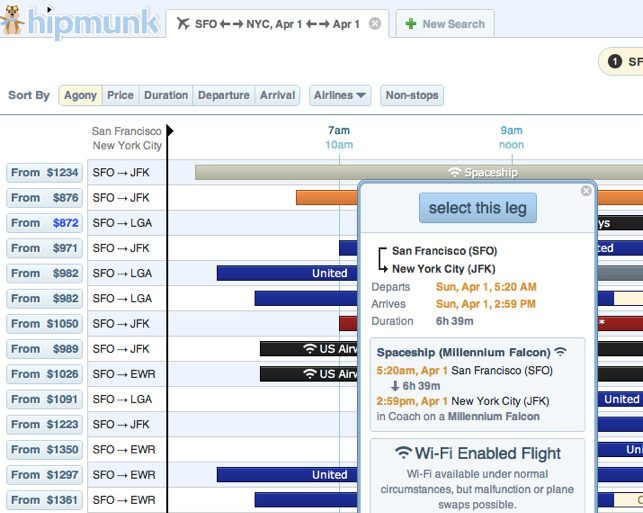
Hipmunk — Sure, flying on an airplane is cool, but as face-melting technology goes, we’re like totally over it. We also want some more destinations … no more of this “LAX –> JFK nonsense. Thanks to flight-booking service Hipmunk, now you can book yourself a spot on the Millennium Falcon. (Unfortunately, Chewy has already eaten all the peanuts.) They’re also offering options like hot air balloon, dog sled, rickshaw, African swallow, stagecoach, and other enjoyable ways to get to where you need to go.
Reddit Timeline — What would the front page of the Internet be without the ability to share and view news from past, present, AND future? Reddit has placed a time-agnostic bar on its home page to let you peruse “timereddits” from the late Cretaceous Period, and check out the latest cat videos 42,000 A.D. Reddit has always pushed the envelope, and now they’re taking you into a worm hole. Reddit blog post here.
Atlassian — Guys, forking code is so yesteryear. Thanks to Atlassian, the makers of software development and collaboration tools, and their bitbucket team, we now know the best — and safest — way to practice pair programming. By spooning. As the peeps at Atlassian put it, “Spooning is a new way to boost developer happiness, and a better way to encourage pull requests. Spoon first, fork later.”
Think Geek — The site for the smart masses has a few great products that you should definitely check out, among them programmable tattoos. Good luck figuring out which are April Fools jokes and which aren’t. ThinkGeek.
Google Search — Google Search just got really advanced. Like really, really advanced.
Here’s last year’s round up, too, just in case you can’t get enough April Fools jokes.
Posted by Joe Knaggs at 22:47 0 comments Email ThisBlogThis!Share to XShare to FacebookShare to Pinterest
Labels: April Fools

Facebook For iPad Gets Retina-Ready (finally)

mzl.upqbgrlg.480x480-75
Facebook rolled out an update this morning that adds support for the new iPad’s Retina display to its iPad application. According to the release notes in iTunes, users with the new iPad will now see “a crisp, high resolution interface.” The update (version 4.1.1) brings other bug fixes, too, as well as support for additional languages.
The Retina-ready version of the app was hinted at last week, when someone spotted a teaser for the upcoming app in the iTunes App Store’s “New and Noteworthy” section. The message displayed at the time read “Enhanced for the New iPad,” presumably meaning it would soon add support for Retina graphics.
As sure enough, that’s just what it did.
The update brings a number of other bug fixes, too, including the following:
  • You can go offline in chat
  • The right profile picture appears for everyone
  • Your list of friends always includes all your friends
  • In sets of photos, your name is displayed correctly
  • Photos of people who like Facebook Pages load correctly
  • Your friend-request notification only lights up if you have a request
In addition, Facebook users can now change their language to Czech, Danish, Greek, Indonesian, Malaysian, Norwegian (Bokmal), Portuguese (Portugal) or Thai in the updated app.
However, as much as new iPad owners may be excited to see one of their most heavily used apps updated with Retina support, perhaps a more highly anticipated feature (or rather feature request) is support for the Facebook Timeline. As the boldest revision to the Facebook user interface to arrive since the News Feed, the Timeline offers a new way to both display and consume Facebook content. And given the iPad’s screen size, it doesn’t seem like it would be a problem to migrate that interface to the iPad.
Posted by Joe Knaggs at 22:45 0 comments Email ThisBlogThis!Share to XShare to FacebookShare to Pinterest
Labels: App reviews, Apple, facebook, iPad
Newer Posts Older Posts Home

Giff Gaff

Get a free giffgaff Sim

Search This Blog

Hit Counter

custom logo

About Me

Joe Knaggs
View my complete profile

Blog Archive

  • ▼  2012 (10)
    • ▼  April (4)
      • Windows 8 Boot to desktop automatically
      • Internet Explorer claws back a bit of market share...
      • April Fools 2012:Every (Tech-Related) Joke On The ...
      • Facebook For iPad Gets Retina-Ready (finally)
    • ►  March (3)
    • ►  January (3)
  • ►  2011 (31)
    • ►  August (1)
    • ►  July (6)
    • ►  June (12)
    • ►  March (7)
    • ►  February (5)
  • ►  2010 (78)
    • ►  December (1)
    • ►  October (2)
    • ►  September (10)
    • ►  August (8)
    • ►  July (7)
    • ►  June (32)
    • ►  May (1)
    • ►  April (9)
    • ►  March (8)
  • ►  2009 (89)
    • ►  December (2)
    • ►  November (6)
    • ►  October (11)
    • ►  September (28)
    • ►  August (14)
    • ►  July (8)
    • ►  June (6)
    • ►  May (14)

Labels

  • Adobe (2)
  • Amazon (1)
  • an ssd (1)
  • Andriod (2)
  • App reviews (11)
  • App Store (1)
  • Apple (78)
  • April Fools (1)
  • Asus (1)
  • ATTI (1)
  • Bitcomet (1)
  • Call of Duty (1)
  • Camcorders (1)
  • Chrome (6)
  • Chrome OS (5)
  • Ciso (1)
  • config (1)
  • Consoles (1)
  • directory (1)
  • DS (1)
  • facebook (2)
  • Firefox (2)
  • Flash (1)
  • Flip (1)
  • Galaxy Tab (4)
  • Games (3)
  • Gigapascal (1)
  • Google (19)
  • Google OS (2)
  • Google TV (1)
  • google wave (1)
  • Google+ (3)
  • guide (1)
  • how to (1)
  • HP (1)
  • Intel (3)
  • Internet Explorer (5)
  • iOS (4)
  • iPad (17)
  • iphone (13)
  • iPhone OS (11)
  • iPod (4)
  • iPod Nano (5)
  • iPod Shuffle (3)
  • ipod touch (38)
  • iTunes (8)
  • itunes 9 (1)
  • itunes 9 concept (1)
  • Kindle (1)
  • Lockerz (4)
  • Mac (8)
  • Mac Mini (2)
  • Macbook (1)
  • Me (1)
  • Microsoft (8)
  • Mifi (1)
  • MinoHD (1)
  • Modern Warfare (1)
  • music (1)
  • Nintendo (1)
  • Opera (1)
  • PC Games (3)
  • regedit (1)
  • Review (2)
  • Safari (1)
  • Samsung (4)
  • set up (1)
  • Skype (1)
  • ssd optimisation (1)
  • Stacks (1)
  • Steam (1)
  • Tap tap revenge 3 (7)
  • tapulous (2)
  • Thunderbolt (1)
  • Touchpad (1)
  • Tumblr (1)
  • tutorial (1)
  • twitter (6)
  • UltraHD (1)
  • Uncategorised (1)
  • user folder (1)
  • Web Browsers (1)
  • Wikipedia (1)
  • windows 7 (26)
  • windows 7 RC (1)
  • windows 8 (3)
  • with (1)
  • wordpress (1)
  • XBOX (2)

All Things Tech By Joe

Loading...

Followers

Powered by Blogger.

My Blogs

  • Games and Fun by Joe Knaggs
    Welcome to ATTI Fun and Games
    5 years ago

About the Blog

This Joe's "All The Tech Info" ATTI Blog which provides you with all the latest tech news.

Categories

  • Adobe (2)
  • Amazon (1)
  • an ssd (1)
  • Andriod (2)
  • App reviews (11)
  • App Store (1)
  • Apple (78)
  • April Fools (1)
  • Asus (1)
  • ATTI (1)
  • Bitcomet (1)
  • Call of Duty (1)
  • Camcorders (1)
  • Chrome (6)
  • Chrome OS (5)
  • Ciso (1)
  • config (1)
  • Consoles (1)
  • directory (1)
  • DS (1)
  • facebook (2)
  • Firefox (2)
  • Flash (1)
  • Flip (1)
  • Galaxy Tab (4)
  • Games (3)
  • Gigapascal (1)
  • Google (19)
  • Google OS (2)
  • Google TV (1)
  • google wave (1)
  • Google+ (3)
  • guide (1)
  • how to (1)
  • HP (1)
  • Intel (3)
  • Internet Explorer (5)
  • iOS (4)
  • iPad (17)
  • iphone (13)
  • iPhone OS (11)
  • iPod (4)
  • iPod Nano (5)
  • iPod Shuffle (3)
  • ipod touch (38)
  • iTunes (8)
  • itunes 9 (1)
  • itunes 9 concept (1)
  • Kindle (1)
  • Lockerz (4)
  • Mac (8)
  • Mac Mini (2)
  • Macbook (1)
  • Me (1)
  • Microsoft (8)
  • Mifi (1)
  • MinoHD (1)
  • Modern Warfare (1)
  • music (1)
  • Nintendo (1)
  • Opera (1)
  • PC Games (3)
  • regedit (1)
  • Review (2)
  • Safari (1)
  • Samsung (4)
  • set up (1)
  • Skype (1)
  • ssd optimisation (1)
  • Stacks (1)
  • Steam (1)
  • Tap tap revenge 3 (7)
  • tapulous (2)
  • Thunderbolt (1)
  • Touchpad (1)
  • Tumblr (1)
  • tutorial (1)
  • twitter (6)
  • UltraHD (1)
  • Uncategorised (1)
  • user folder (1)
  • Web Browsers (1)
  • Wikipedia (1)
  • windows 7 (26)
  • windows 7 RC (1)
  • windows 8 (3)
  • with (1)
  • wordpress (1)
  • XBOX (2)

FEEDJIT Live Traffic Map

Feedjit Feed

Follow me on twitter

Follow frolicols on Twitter

Kontera

 
Copyright (c) 2010 All Things Tech By Joe Knaggs. Designed for Video Games
Download Christmas photos, Public Liability Insurance, Premium Themes