skip to main | skip to sidebar

All Things Tech By Joe Knaggs

Pages

  • Home
  • YouTube

Thursday, 30 June 2011

App Store Tops 100,000 Available iPad Applications


As noted by MacStories, Apple's App Store has reached yet another milestone, now offering over 100,000 iPad-specific applications.

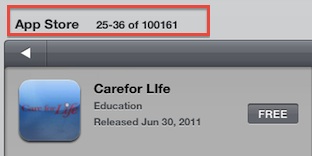
Apple and third-party developers have set a new record: in 453 days since the original iPad came out on April 3, 2010, the App Store has more than 100,000 iPad-exclusive apps available. Either specifically targeting the tablet, or released as universal updates to existing iPhone apps, at the moment of writing this there are 100,161 iPad apps in the Store. How do I know? The App Store app itself on my iPad shows that.
Our sister site AppShopper, which tracks iPhone, iPad, iPod touch, and Mac App Store apps, currently has the available iPad app count at just over 106,000, as it relies on a slightly different recording method supplied by Apple's API for tracking App Store apps. 

Apple currently offers over 400,000 total apps in its iOS App Store, and over 5,000 more in its Mac App Store.
Posted by Joe Knaggs at 23:22 0 comments Email ThisBlogThis!Share to XShare to FacebookShare to Pinterest
Labels: App Store, Apple

MacBook Supplies Tightening at Third-Party Retailers Ahead of Potential Refresh [Update: Mac Mini Too]

AppleInsider notes that MacBook supplies have become "severely constrained" at a number of third-party retailers, suggesting that Apple may be drawing down stocks ahead of a refresh.
Specifically, Amazon, MacConnection, On Sale and J&R are all out of stock. In addition, inventory of the entry-level portable is low at DataVision. 

In addition, one of Europe's largest distributors is completely out of stock of the white MacBook, and lists no estimated time of arrival for new shipments. Sources indicated that this is unusual, but not necessarily a sign that the current model will be discontinued.
Shipping estimates for orders made through Apple's online stores around the world remain at "within 24 hours", suggesting that the shortages have not yet extended to Apple's own distribution channels. But shortages at third-party retailers are frequently the first indications of Apple preparing to release updated models. 


As noted in our Buyer's Guide, Apple is well overdue for a MacBook refresh as judged by its usual update cycle, having last updated the MacBook in May 2010. 

Rumors of updated MacBooks have been essentially nonexistent, although the Machine will presumably make the shift to Intel's Sandy Bridge platform and include Thunderbolt support. And while no specific timeframe for an update has been offered, the line is clearly one of many including the MacBook Air, Mac Pro and Mac mini that are due for an update. Apple has been said to be holding new hardware launches until OS X Lion is ready, and so we may see a flood of new releases once the operating system debuts next month. 

Update: AppleBitch reports that Best Buy's online store and Amazon UK are also currently out of stock of the Mac mini. While the shortages are not as widespread as seen with the MacBook, they could be early signs of a drawdown for that line as well, which was last updated in June 2010 with a new design.
Posted by Joe Knaggs at 23:22 0 comments Email ThisBlogThis!Share to XShare to FacebookShare to Pinterest
Labels: Apple, Mac

MacBook Air Update Coming in Mid-July?

Many customers have been waiting for Apple to begin shipping its long-rumored updated MacBook Airs, bringing a significant performance improvement to the line with the incorporation of Intel's Sandy Bridge platform. A number of reports had pegged the release for the June-July timeframe, but the June dates are essentially out of the picture now and Apple has been said to be holding the release until it can offer OS X Lion preinstalled on the new machines. 


Chatter is now beginning to coalesce around a mid-July launch, and we've been hearing that Apple may be planning a MacBook Air launch for the third week of the month.AppleNApps seems to agree, with several sources there reporting that Apple plans to release the new MacBook Airs alongside OS X Lion on Tuesday, July 19th.

Sources have indicated to AppleNApps that Apple has an internal launch date of July 19th for Mac OS X Lion and a refresh of the MacBook Airs. This is the target date under which the company is currently operating, though both sources are indicating that things can change. Our sources have just seen indications, and can’t be entirely certain, but if everything goes according to plan there will be a new MacBook Air shipping with Lion starting July 19th.
That would coincide with Apple's earnings announcement for the quarter just ending, providing the company with enticing discussion fodder for the conference call. 

9 to 5 Mac also reports that it has been hearing Thursday, July 14th in the "rumblings" regarding a launch for Lion and new MacBook Airs, adding to the increasing consensus of a release right around the middle of the month.
Posted by Joe Knaggs at 23:21 0 comments Email ThisBlogThis!Share to XShare to FacebookShare to Pinterest
Labels: Apple, Mac

Twitter Reaches 200 Million Tweets A Day, But How Many Come From Bots?

Twitter just crossed another huge milestone. People are now sending 200 million tweets per day across the service. This is up from 65 million tweets per day a year ago, or about 200 percent growth in a year. Last March, Twitter reported 140 million tweets per day last March. Way back in January, 2009 people were only sending 2 million tweets per day.
Well, “people” is perhaps a generous term. Twitter is filled with automated bots Tweeting out, as well as feeds from publishers. It is not clear how many of those 200 million Tweets a day are automated versus individually hand-crafted. And a small percentage of power users (maybe 20,000 total) reportedly account for half of all Tweets with links, for example, (although this is based on a study that only looked at data through March, 2010 and may now be outdated).
But other data suggests that Twitter’s audience keeps on growing. ComScore estimates that Twitter.com alone attracted 139 million unique visitors worldwide in May, 2011, a 54 percent annual increase. On a worldwide basis, Twitter is bigger than MySpace. In the U.S., however, traffic is up only 12.5 percent to Twitter.com, which attracted an estimated 27 million unique visitors in May, 2011.
Posted by Joe Knaggs at 23:21 0 comments Email ThisBlogThis!Share to XShare to FacebookShare to Pinterest
Labels: twitter

Samsung’s Galaxy Tab 8.9 Hits The FCC


We caught a brief glimpse of the Galaxy Tab 8.9 about a month ago, but it’s just nowhitting the FCC for all its tests, readings, and diagnostics. The new Tab is much the same as the old Tab (i.e. the 10.1) but packed into a smaller package. I’m excited for better pixel density, though Samsung is also working on amonster increase in resolution.
The 8.9 has a 3G radio communicating on AT&T’s frequencies, and since there don’t appear to be GSM or wi-fi variants being tested by the FCC at this time, it seems safe to say that’s the version we’ll see first.
Posted by Joe Knaggs at 23:20 0 comments Email ThisBlogThis!Share to XShare to FacebookShare to Pinterest
Labels: Galaxy Tab, Samsung

Steam Summer Camp Sale Now Underway!


Steam’s big Summer Camp Sale starts today! Not that you can buy anything right now, since the store is buckling under the weight of the traffic. Reddit user Remmib has put together a nice little listing of most of the deals here, but you might want to wait an hour or two before trying to get in there.
Some standouts: Valve Complete Pack (Portal 2 included) for $50, Borderlands for $5, a great id pack for $30, and the Rockstar Collection for $40. Ah, Summer!
Posted by Joe Knaggs at 23:20 0 comments Email ThisBlogThis!Share to XShare to FacebookShare to Pinterest
Labels: Steam

How to hack Google+ to send your friends invites (maybe)


Here in Europe we woke up to find Google had shut down the invitation process to Google +. So after a bit of testing I’ve found out the following how to bring your friends in to it while Google has a lock-down on the service.
If you have an invite to join Google+, right click on the invite link you were sent on email and save the URL. Paste that URL to Twitter or Facebook or email it to some friends. With any luck some of them will get in via that link.
I tried this by Tweeting my own invite link, and magically a few people managed to get an invite of their own. Most did not however, so this is not a full proof work-around. It seems to work if people waited a couple of minutes or refreshed the page after a minute.
The better, more guaranteed hack is one or both of the following.
An existing user on Google+ creates a new Circle, called (for example) Invites. They then add the emails of the people they want to invite to that circle.
An additional work-around – which also appears to work on its own – is simply creating a status update (it’s called a ‘Share’ on Google+), e.g. “inviting people” and then pasting the Gmail addresses of friends you want to invite into the “add people” box (Next to +1 and Comment links).
They should then get a copy of your status update in their email and link saying “Learn more about Google+”. They can then click on that and will get taken to your post, with a Join Google+ button.
Let us know how you get on in the comments below (ironically, Facebook powered).
Update: It would appear the last suggestion here is the simplest and most fool-proof.
Posted by Joe Knaggs at 23:20 0 comments Email ThisBlogThis!Share to XShare to FacebookShare to Pinterest
Labels: Google, Google+

Teardown Shows Apple’s Thunderbolt Cables Aren’t Just Wires Wrapped In Rubber

From iFixIt


There are plenty of cables out there that are essentially just long pieces of metal protected by a rubber sheath. Their job is to carry a voltage, and they do. Thunderbolt (and presumably other, non-branded versions like Sony’s) is a little different. It seems that not all the horsepower is in the port; some has to be offloaded onto the cable itself.
This teardown at iFixit shows it’s not just the Apple Tax that makes the cables expensive, though what exactly is going on in those little chips is still mostly unknown.
Posted by Joe Knaggs at 23:19 0 comments Email ThisBlogThis!Share to XShare to FacebookShare to Pinterest
Labels: Apple, Thunderbolt

Skype For Android Now Supports Video Calls, Works Over WiFi And 3G


Thanks to an update of Skype’s Android application, you can now make one-to-one video calls over both WiFi and 3G connections. You can download the Skype app from the Android Market or point your browser to Skype.com/m from your phone.
Note that your smartphone needs to be running Android Version 2.3 (or above) and have a front-facing camera. Supported handsets include the HTC Desire S, Sony Ericsson Xperia neo, Sony Ericsson Xperia pro and the Google Nexus S.
This is just the first phase, Skype says, so expect support for more devices soon.
Once installed, you can have video calls from your Android phone with your Skype contacts on iPhone, Mac, Windows PCs and even a number of TVs.
The Skype for Android app has also been given a new lick of paint.
There’s now a new main menu where you can navigate more easily through your contacts, access your Skype profile to change personal details, use the dial pad to make calls and see the balance of your Skype Credit.
A new mood message box at the top of the Skype app menu also enables you to share whatever you’d like to share with your contacts.
Finally, you can now send SMS messages from the Android app.
Neil Stevens, Skype’s vice president and general manager for product and marketing, says approximately 30 million concurrent users log into Skype at any given time and make up to half a million simultaneous video calls (at peak times as of June 2011).
Posted by Joe Knaggs at 23:19 0 comments Email ThisBlogThis!Share to XShare to FacebookShare to Pinterest
Labels: Andriod, Skype

Review: The HP Palm TouchPad

From Crunchgear


Features:
  • 9-inch touchscreen
  • Runs Flash 10.1 (sort of)
  • Qualcomm Snapdragon dual-CPU APQ8060 1.2GHz 1024×768 pixel display
  • Wi-Fi, Bluetooth, No Cellular Connectivity
  • MSRP: 16GB/$499 32GB/$599
Pros:
  • Beautiful OS
  • Strong PIM and media functions
  • Works well with Pre phones
Cons:
  • App store is barren
  • Performance falters with use
  • Temperamental battery life

Short Version: Like Duckie from Sixteen Candles, Palm has been the perennial third choice. Even in its late heyday, when the Treo still ruled the airwaves and the iPhone was a faint glimmer in Apple’s eye, they got the short end of it with consumers and critics. But there was – and is – a zealous minority who see Palm as the Third Way, a way out of Apple/Android/Microsoft hegemony and who see WebOS as a viable alternative. And they will be abundantly pleased by this device.
Palm is back, albeit in a form that speaks more to HP’s cost-cutting measures than to the heavy duty devices you remember. WebOS and the Palm TouchPad are nearly perfect, an excellent amalgamation of everything that was ever right about Palm. But is even perfection, in this market, enough? Without a strong app base and some work on performance issues, the TouchPad may be the most beautiful dead end we have seen yet. But there is hope.
Long Version: To be a Palm fan has long been an exercise in frustration. First Palm was gone, then resurrected. Then it was gone again, swallowed by a market giddy for Android and iPhone. Then HP brought it back and promised WebOS would appear on printers and PCs, a neutering that would surely destroy the once-great company. Then, praise to the great god Quatzequatel, they made the TouchPad, a device that would bring WebOS back into the game.
And it has, with a few caveats. Let’s begin.
The Device
The TouchPad is not a slim device. It is clad in bulbous black plastic that takes fingerprints like a crime scene and has a large, 9-inch touchscreen. There is one button at the bottom the screen and volume controls on the side. On the opposite side are two large speaker grills; audio playback is strong and loud and the TouchPad, when paired with a phone, makes a good speakerphone.

High gloss
The TouchPad has the same screen pixel density as the iPad 2 but makes more of all of that real estate thanks to the clever WebOS interface.
When docked in its TouchStone inductive charger, the TouchPad doubles as a clock, mail reader, and photo viewer. The dock is quite cool but if you place the TouchPad on it and the inductive connection is not solid the device will buzz slightly, which is disconcerting.
The screen is covered in plastic and I noticed that when stuck into a tight laptop bag the outside screen would stick to the LCD, a problem that made it appear that the LCD had cracked. It had not.
In all, the TouchPad is about the same size as almost any other major name tablet except the iPad 2. It is as thick as the Xoom and the original iPad but the bulbous shape makes it feel a bit bigger. It isn’t very heavy – 1.6 pounds compared to 1.3 pounds for the iPad 2 and 1.6 for the Xoom – but it “feels” heavier and heftier. I would worry that a case, which it sorely needs out of the box, would make it even heavier, although I did actually see a TouchPad with a Smart Cover-esque folding case that looked quite promising.
A word about the plastic: the unit I was testing is already scratched on its back from a bit of regular use. This will definitely disturb those who keep their devices in pristine condition and combined with the patina of smudges this device collects over time it will eventually make your TouchPad look like the counter at a turnpike diner. I wouldn’t harp on this if it weren’t true: almost immediately the TouchPad, like many Pre devices, begins looking greasy.
A goofy little FCC ID tag pops out from the lower right side of the device. There is no SD card slot or SIM card slot.
The device has a 1.3 megapixel front camera and no rear camera. There is no camera application (that I could find) although you can make video calls through Skype. Photography is clearly not a priority with this device.
The TouchPad can be charged via micro USB or induction. It charges very slowly when connected to a PC – but it charges – and you can enable it as a storage device to drag over files, music, photos, and movies.

“The Dock and the Keyboard,” the new Decemberists album
Connectivity
The TouchPad has 802.11b/g/n networking, Bluetooth, and a special Bluetooth variant that it uses to connect to Palm Pre devices. It does not support cellular networks (yet) and the only way to get online is to connect to a hotspot.
A-GPS is available in mobile versions only and this device seems to grab location via the current hotspot. It definitely didn’t find my exact house but it did find Bay Ridge and point to a corner of the neighborhood where I might reside.
The TouchPad interacts with the Palm Pre, specifically the Pre 3. Pre interaction is quite cool but quite limited. In the current case, you can place the phone close to the TouchPad and send the current website you’re browsing to the phone. A clever “water drop” animation shows you when the transfer has been made and then the website appears on the phone. Unfortunately, lots of other weird stuff happens on the TouchPad, with cards opening and closing wildly without explanation.
The TouchPad also supports a Bluetooth keyboard with special WebOS buttons that allows for a far more comfortable typing experience for those accustomed to hard buttons. The onscreen keyboard tend to disappear when the Bluetooth keyboard is paired, which could cause some consternation.

We Are Family
Battery
Battery life was difficult to assess on this device during the time I had. I saw about 18 hours between charges with low use although the device would run down to nearly zero and stay there for a good five hours in standby, hanging onto its last electrons for dear life. Heavy use run-down is also variable depending on the number of apps you open, close and use and we saw it run down from 24% to 10% in a few minutes with plenty of slipping, sliding, and tapping.
Video playback and reading brought battery life down to about six hours although there are settings to reduce screen brightness and autolocks that could increase that number with some tweaking.
In short, battery life is on par if better than almost any tablet you can name although the variability I saw could put a damper on longer media playback. However, I saw nothing alarming or particularly notable when it came to battery life, at least in the limited testing I was able to do.
If your battery is run down it is very difficult to charge it with the TouchStone charger. A direct USB charge is best in situations where the device has run down to red.
WebOS

WebOS is the real star of this show. The OS offers true multi-tasking and uses a system of “cards” and “stacks” to display active applications. The OS also uses a system called Synergy to sync with services in the cloud and to save logins and accounts that can be moved from one device to another.
When you activate an application, it moves onto a smaller “card” and then expands into fullscreen when completely loaded. Swiping up from the bottom of the screen (or pressing the home button) brings all of the cards back up and you can tap and hold a card to move to to another stack. For example, you can stack similar tasks together (“Emails to send today,” “Web pages to read,” “Images of cats to coo at”). You can also flick apps up and away, shutting them down or closing their windows.
The second major metaphor is the “leaf.” This is draggable corner of many windows that exposes or hides more information. For example, you can open and close leaves in many applications including the Facebook app, adding layers of data to many apps.
Finally, there is the notifications system. This system is far superior to any other I’ve seen. There are lock screen notifications that can be acted upon and mail notifications, for example, are actually stacked, allowing you to flick through recently received mails right from the notifications bar. This is an excellent solution and alone could be considered worth the price of admission.
Synergy also allows a great deal of Facebook interaction. For example, in the Photo and Movies app (where your videos eventually end up, for some odd reason).
“Just Type” is a search function that searches the device, the Web, and then connects to any search APIs you have added during your search sessions. For example, TechCrunch supports this search API and you can search TechCrunch in addition to the other sources you’ve chosen. Just Type appears on almost every screen or is at least available with a single button press.
The device plays back MPEG-4, H.263, and H.264 video and (this is straight from the product page) “DRM-free MP3, AAC, AAC+, eAAC+, AMR, QCELP, and WAV.” Video playback is more than acceptable and a special desktop app allows for music syncing with iTunes libraries. Oddly, videos and photos appear in the same app, which makes things confusing. Synergy will also bring in your Facebook photo albums although these are often at sub par resolution.
There are a few other native apps. Email and Calendar work as expected and the Email client has a unified inbox that brings in all of your new messages. IM and SMS support works well and the TouchPad will mirror SMSes received on your Pre.
A YouTube app brings up the YouTube website, which was kind of a letdown.

The browser is quite capable and rendered almost every website without issues. It supports Flash 10.1 and can display complex animations but Flash games are a different story. The browser usually defaults to the full version
The Apps

Here’s where things start the break down.
The TouchPad App Catalog, as its called, is very limited. A service called Pivot – essentially an online magazine – allows developers to showcase their apps and stories related to various activities – gaming, entertainment, vacations – call out various apps available in the store.
As it stands, however, there are very few native TouchPad apps and non-native apps appear half sized on the TouchPad’s ample screen with no opportunity to resize them. The Rosetta Stone of apps, Angry Birds, is available to those still enamored by these damn avian/porcine wars but once you get past that app it’s pretty slim pickings. There are no Instagram or Reddit apps but there are Facebook and Twitter apps, the former being one of the best I’ve seen. Generally, however, we’re talking about a relative wasteland.
Will this change? Absolutely. I worry that i won’t change fast enough but that’s not for me to assess. I look forward to having a robust WebOS app store and I think developers will deign to develop for this platform with enough market penetration.
Now, on to the bottom line:
The Bad
  • The TouchPad exhibits poor performance under pressure. I hate to say it, but far too many times the TouchPad bogged down while performing standard tasks. The biggest, most frustrating problems appeared when browsing photos. The UI would slow down and register taps a few seconds later. Photo viewing performance is key for devices like these simply because the average user is watching movies, surfing the web, and looking at pictures.
  • Flash is slow. Why doesn’t Apple like Flash? Because it’s a resource hog, it doesn’t react well to touch input, and it doesn’t work. The Dreamworks page shown here loaded just fine but trying to play the Kung Fu Panda game advertised on that same page was a waste of CPU cycles. But it works, so there’s that.
  • Fingerprints and scratches galore. Get a case when you get the TouchPad. It needs one.
  • Apps will make or break this thing. Applications will make this a winner or loser in the court of popular opinion. WebOS is amazing, but I worry its features aren’t being done justice with the paucity of apps.
The Good
  • WebOS is great. It’s a breath of fresh air. It’s impressively powerful and, judging from some of the apps already written, fairly easy to write and publish for. It’s exciting that it exists.
  • Generally it’s an excellent start. If a smaller, 7-inch unit comes soon and, more important, HP begins supporting WebOS on other hardware, it could give this OS legs. If HP relegates this to just a multimedia shell and doesn’t support this as a real mobile/laptop OS, similar to Chrome OS, I’d be concerned with the lifetime of this product.
  • It’s a handsome package. There are lots of tablets out there, this is one of the best. The same can’t be said of many of the Android me-to tablets and craplets coming out.
  • It’s priced about right. It’s powerful enough to deserve a $500 price tag, placing it firmly in the ranks of mid- to high-level tablets.
The Bottom Line
WebOS is a capable third (or fourth) entrant into the mobile OS race. As with Duckie, however, I worry that the average Molly Ringwald will go with the popular Blaine rather than the loyal and arguably better school nerd. I don’t agree that the TouchPad will knock WebOS out of the park but HP had to do something with its intellectual property and there’s no reason they won’t support this going forward.
I’m rooting for Duckie. I want him to win. Do I think it’s possible in the milieu in which we’re currently operating, with countless Android tablets flooding the market with product and a major player “flummoxing” all comers? I don’t know. I really don’t. I called the death of Palm as a standalone entity early when they announced the Pre and it was clear the mobile market couldn’t support an also-ran. I hope that HP’s might and Palm’s current experience will pull them through this renaissance and I think they’ve produced a strong tablet with a strong OS for a market that has drastically changed since they last failed.

newpalm-2118
newpalm-2114
newpalm-2113
newpalm-2112


newpalm-2110
newpalm-2108
newpalm-2107
newpalm-2105


newpalm-2103
newpalm-2102
newpalm-2101
newpalm-2099


newpalm-2097
newpalm-2094
newpalm-2093
newpalm-2091


newpalm-2088
newpalm-2087
newpalm-2086
newpalm-2085


newpalm-2084
newpalm-2080
newpalm-2079
newpalm-2077


newpalm-2076
newpalm-2074
newpalm-2072
newpalm-2069


newpalm-2066
Posted by Joe Knaggs at 23:19 0 comments Email ThisBlogThis!Share to XShare to FacebookShare to Pinterest
Labels: HP, iPad, Touchpad
Newer Posts Older Posts Home

Giff Gaff

Get a free giffgaff Sim

Search This Blog

Hit Counter

custom logo

About Me

Joe Knaggs
View my complete profile

Blog Archive

  • ►  2012 (10)
    • ►  April (4)
    • ►  March (3)
    • ►  January (3)
  • ▼  2011 (31)
    • ►  August (1)
    • ►  July (6)
    • ▼  June (12)
      • App Store Tops 100,000 Available iPad Applications
      • MacBook Supplies Tightening at Third-Party Retaile...
      • MacBook Air Update Coming in Mid-July?
      • Twitter Reaches 200 Million Tweets A Day, But How ...
      • Samsung’s Galaxy Tab 8.9 Hits The FCC
      • Steam Summer Camp Sale Now Underway!
      • How to hack Google+ to send your friends invites (...
      • Teardown Shows Apple’s Thunderbolt Cables Aren’t J...
      • Skype For Android Now Supports Video Calls, Works ...
      • Review: The HP Palm TouchPad
      • Get Posting With Gorgeous New Tumblr iPhone App
      • China Is Already Blocking Google+
    • ►  March (7)
    • ►  February (5)
  • ►  2010 (78)
    • ►  December (1)
    • ►  October (2)
    • ►  September (10)
    • ►  August (8)
    • ►  July (7)
    • ►  June (32)
    • ►  May (1)
    • ►  April (9)
    • ►  March (8)
  • ►  2009 (89)
    • ►  December (2)
    • ►  November (6)
    • ►  October (11)
    • ►  September (28)
    • ►  August (14)
    • ►  July (8)
    • ►  June (6)
    • ►  May (14)

Labels

  • Adobe (2)
  • Amazon (1)
  • an ssd (1)
  • Andriod (2)
  • App reviews (11)
  • App Store (1)
  • Apple (78)
  • April Fools (1)
  • Asus (1)
  • ATTI (1)
  • Bitcomet (1)
  • Call of Duty (1)
  • Camcorders (1)
  • Chrome (6)
  • Chrome OS (5)
  • Ciso (1)
  • config (1)
  • Consoles (1)
  • directory (1)
  • DS (1)
  • facebook (2)
  • Firefox (2)
  • Flash (1)
  • Flip (1)
  • Galaxy Tab (4)
  • Games (3)
  • Gigapascal (1)
  • Google (19)
  • Google OS (2)
  • Google TV (1)
  • google wave (1)
  • Google+ (3)
  • guide (1)
  • how to (1)
  • HP (1)
  • Intel (3)
  • Internet Explorer (5)
  • iOS (4)
  • iPad (17)
  • iphone (13)
  • iPhone OS (11)
  • iPod (4)
  • iPod Nano (5)
  • iPod Shuffle (3)
  • ipod touch (38)
  • iTunes (8)
  • itunes 9 (1)
  • itunes 9 concept (1)
  • Kindle (1)
  • Lockerz (4)
  • Mac (8)
  • Mac Mini (2)
  • Macbook (1)
  • Me (1)
  • Microsoft (8)
  • Mifi (1)
  • MinoHD (1)
  • Modern Warfare (1)
  • music (1)
  • Nintendo (1)
  • Opera (1)
  • PC Games (3)
  • regedit (1)
  • Review (2)
  • Safari (1)
  • Samsung (4)
  • set up (1)
  • Skype (1)
  • ssd optimisation (1)
  • Stacks (1)
  • Steam (1)
  • Tap tap revenge 3 (7)
  • tapulous (2)
  • Thunderbolt (1)
  • Touchpad (1)
  • Tumblr (1)
  • tutorial (1)
  • twitter (6)
  • UltraHD (1)
  • Uncategorised (1)
  • user folder (1)
  • Web Browsers (1)
  • Wikipedia (1)
  • windows 7 (26)
  • windows 7 RC (1)
  • windows 8 (3)
  • with (1)
  • wordpress (1)
  • XBOX (2)

All Things Tech By Joe

Loading...

Followers

Powered by Blogger.

My Blogs

  • Games and Fun by Joe Knaggs
    Welcome to ATTI Fun and Games
    5 years ago

About the Blog

This Joe's "All The Tech Info" ATTI Blog which provides you with all the latest tech news.

Categories

  • Adobe (2)
  • Amazon (1)
  • an ssd (1)
  • Andriod (2)
  • App reviews (11)
  • App Store (1)
  • Apple (78)
  • April Fools (1)
  • Asus (1)
  • ATTI (1)
  • Bitcomet (1)
  • Call of Duty (1)
  • Camcorders (1)
  • Chrome (6)
  • Chrome OS (5)
  • Ciso (1)
  • config (1)
  • Consoles (1)
  • directory (1)
  • DS (1)
  • facebook (2)
  • Firefox (2)
  • Flash (1)
  • Flip (1)
  • Galaxy Tab (4)
  • Games (3)
  • Gigapascal (1)
  • Google (19)
  • Google OS (2)
  • Google TV (1)
  • google wave (1)
  • Google+ (3)
  • guide (1)
  • how to (1)
  • HP (1)
  • Intel (3)
  • Internet Explorer (5)
  • iOS (4)
  • iPad (17)
  • iphone (13)
  • iPhone OS (11)
  • iPod (4)
  • iPod Nano (5)
  • iPod Shuffle (3)
  • ipod touch (38)
  • iTunes (8)
  • itunes 9 (1)
  • itunes 9 concept (1)
  • Kindle (1)
  • Lockerz (4)
  • Mac (8)
  • Mac Mini (2)
  • Macbook (1)
  • Me (1)
  • Microsoft (8)
  • Mifi (1)
  • MinoHD (1)
  • Modern Warfare (1)
  • music (1)
  • Nintendo (1)
  • Opera (1)
  • PC Games (3)
  • regedit (1)
  • Review (2)
  • Safari (1)
  • Samsung (4)
  • set up (1)
  • Skype (1)
  • ssd optimisation (1)
  • Stacks (1)
  • Steam (1)
  • Tap tap revenge 3 (7)
  • tapulous (2)
  • Thunderbolt (1)
  • Touchpad (1)
  • Tumblr (1)
  • tutorial (1)
  • twitter (6)
  • UltraHD (1)
  • Uncategorised (1)
  • user folder (1)
  • Web Browsers (1)
  • Wikipedia (1)
  • windows 7 (26)
  • windows 7 RC (1)
  • windows 8 (3)
  • with (1)
  • wordpress (1)
  • XBOX (2)

FEEDJIT Live Traffic Map

Feedjit Feed

Follow me on twitter

Follow frolicols on Twitter

Kontera

 
Copyright (c) 2010 All Things Tech By Joe Knaggs. Designed for Video Games
Download Christmas photos, Public Liability Insurance, Premium Themes