skip to main | skip to sidebar

All Things Tech By Joe Knaggs

Pages

  • Home
  • YouTube

Tuesday, 29 September 2009

Windows 7 vs Vista vs XP On Games Part 2

The official Games for Windows site lists a total of nine games and some of those are rather suspect – Hellgate: London suffered an unfortunate early death, while Age of Conan's DX10 implementation still isn't live (there's a cut-down client being tested right now, but many of the effects that were shown off nearly a year ago aren't present).

Crysis is still one of the platform's best looking titles, although it's hardly cutting-edge now. For many gamers, the lack of any real benefit to DX10 is still the problem – it just doesn't do enough to warrant going out of your way to upgrade to. Sure, there are some nice effects, but clever shader programming can knock out incredible effects in DX9 too. Cast your eyes over GRID's loveliness for simple proof of this.

Game developers don't want to limit themselves to a niche of the existing market just for the odd effect either – it's simply not worth it. You only need look at the popularity of the likes of WoW to see that games don't need hi-tech visuals to be successful.

You also shouldn't forget that a fair chunk of games are console ports and that Xbox 360 doesn't have a pile of DX10 cleverness hiding behind the red ring of death – it's DX9 in nature (although admittedly with some clever DX10-like tricks up its wizard's sleeve).

So we're not convinced about DX10 as a selling point for an OS although, to be fair, it's a great way of showing off the capabilities of your graphics card. It's telling that DirectX 11 isn't going to have quite the same marketing push that its predecessor did (who can forget the ridiculous Flight Simulator images Microsoft pushed out to show how much better DX10 was than DX9). In other words don't expect any DirectX 11 only games to appear any time soon.
A more pertinent question these days is whether to install a 32-bit or 64-bit OS. Windows XP started the ball rolling with x64, but in truth the driver support was too ropey to make this a serious consideration – indeed, we couldn't get our test machine stable enough for testing in Windows XP x64. Vista and 7 are a different story though, and it's the 64-bit versions that show the best performance in Far Cry 2.

Part of the reason that the 64-bit versions do so well is because the operating system and game/ benchmark has access to the full gamut of memory. Our test rig has 6GB of DDR3 and the difference this makes to the benchmarks is obvious. Memory is one of the main driving factors in a move to a 64-bit OS and as prices of RAM continue to drop, so that option becomes more and more appealing.

In Far Cry 2, for instance, we saw an increase of two or three extra frames per second in-game, plus faster loading times for the actual games themselves, both for initial loading and for levels. Factor in much smoother alt-tabbing and it's easy to see that the move to 64-bit brings many benefits and no obvious downsides.

Speaking of loading times, our testing highlighted some interesting numbers and some confusing ones as well. Far Cry 2, for instance, may run relatively slowly in Windows XP, but it loads incredibly quickly in it – twice as quickly as it does in Vista 64.

GRID loaded quickest on the 64-bit operating systems, which points to efficient use of memory once again. The best loading time for the OS goes to Windows 7 though, rolling in at just over a minute. Note that these times were recorded from the moment the power button was pressed, and so include the POST as well.

The choice of which OS you should go for isn't just about loading times or even frame rates. It's also about usability. It's about how comfortable you are with using it and it's about compatibility. Windows 7 is commendable at this stage for just working with pretty much everything we threw at it (although for some reason on this machine it wouldn't play ball with Fraps). Once again, this gives us high hopes for its future, particularly when compared to the ill-tempered Vista launch.

Only once you've used an operating system can you really know if it's for you. Try as we might, we're still not comfortable with Vista, while Windows 7 doesn't irk us anywhere near is much. It's a personal thing. Indeed, every time we mention that Windows Vista is less than perfect we get plenty of readers complaining about the fact. Maybe all our messing around with operating systems on a daily basis has spoiled us, but given the choice we'd still go for Windows XP for pure DX9 speed and Windows 7 64-bit for the good all-round experience.
Should you change your operating system just to get a few more frames out of your hardware? That really depends on what you use your machine for. If, for instance, you overclock your rig and are out to get the fastest frame rates around, then sticking with Vista when you could be getting more frames out of XP seems churlish.

We're not talking double figure differences here, but then again, your overclocking generally only amounts to a few extra frames as well. If, however, you want to run DX10 games, then Vista is in surprisingly good shape – it's by far the fastest way to enjoy the likes of Far Cry 2 and there's no question that your games will run.

Ideally you'll have 4GB of RAM or more and be able to run Vista 64 too. And what of Windows 7? It's fast, particularly for number crunching, and can perform well with the latest games, but if you're looking for speed alone it doesn't quite beat Vista yet.
Posted by Joe Knaggs at 16:27 0 comments Email ThisBlogThis!Share to XShare to FacebookShare to Pinterest
Labels: windows 7

Windows 7 vs Vista vs XP On Games Part 1

Even now, it's hard to think of a single killer app that makes DX10 look any better than the huge swathe of DX9 games. This is why there are still plenty of people out there who are running their games under Windows XP. Add Windows 7 into the mix and you now have a three-way fight for your gaming attentions. But which one should you have running on your main gaming rig?

The reliable Windows XP, the pretty but oft-maligned Vista or the new kid on the block who hasn't even earned his racing wheels yet? We think it's time to put these operating systems to the test on a suite of benchmarks and see which one impresses us the most.

How we tested

In order to assess how these operating systems perform on a mainstream gaming PC, we've elected to torture a Dell for your delectation. The Studio XPS M435T we've picked boasts a Core i7 920 at its heart and 6GB of DDR3 1066MHz triple channel memory, making it a serious number cruncher when given room to strut its stuff.

Things aren't quite so carefree in the graphics department though, and in order to hit a decent price point (the machine can be picked up for around £700) it features a single 512MB GeForce 9800GT. Not a gaming powerhouse, but a capable enough performer for our testing.

For the benchmarks we've focused on gaming, putting Codemasters' seminal GRID, Ubisoft's brilliant Far Cry 2 and the splendid RTS-'em-up World in Conflict to task separating the OS wheat from the chaff. 

GRID boasts a brilliantly optimised rendering engine, which shouldn't push the hardware too much. Far Cry 2 is taxing with all the features turned on and requires just as much rendering muscle as processing power. World in Conflict shows off the differences between DX9 and DX10 rendering and is one of the most reliable benchmarks we've used in the office.
To accompany these results, we've also benchmarked the operating systems using that perennial favourite, 3DMark06. Futuremark may have released 3DMark Vantage a while ago now, but we're still not convinced about its usefulness for assessing a system's gaming performance. For overall system performance we've used PCMark05 (although this only works in 32-bit versions of Windows) and Cinebench R10 for more serious work (there are separate 32-bit and 64-bit executables).


Finally, we've recorded boot times for the operating systems and for GRID and Far Cry 2. The results for these timed tests were a little surprising as well.


Meeting expectations

We'll freely admit that we expected Windows 7 to shine like a particularly shiny thing in these gruelling tests. One thing that came to light straight away though, is that it isn't as honed under the hood as it feels. The interface might be smooth and everything might work, but the code isn't optimised, there's debug code swilling around and, from what we can see, Nvidia's drivers still have room for improvement.

There is some good news with Windows 7 though. Firstly, raw processing performance is stronger than in Windows XP and Vista. The Maxon Cinebench test can be used on machines boasting up to 16 cores, so it quite happily handles the eight that show up here (that's HyperThreading across four real cores).


The first two sets of results focus purely on CPU rendering and put Windows 7 in the lead, particularly in the multiple-core test. Vista isn't far behind, but if you want a serious rendering platform there are good things coming. This message was backed up when we configured the graphics settings as low as possible in World in Conflict.


By doing this, we push the graphics card out of the rendering loop as far as we can and focus on straight computation. The 64-bit version of Windows 7 managed 245fps, while 32-bit Vista brought up the rear with 210fps. Microsoft has heavily optimised the code paths in its soon-to-be -released OS, which will benefit gamers as well as more serious number crunchers.

The key reason Windows 7 isn't topping the benchmarks is due to the state of Nvidia's drivers. This isn't a dig at the GPU giant, merely a statement of fact – after all, the OS hasn't been released yet. Cast your mind back to the release of Vista and the shaky start that had and we'd hazard a guess that Nvidia will be pushing up the framerates as the launch date nears.

We saw a hint of this as we went from the 179.11 drivers that were installed by default, up to the latest available at the time of testing: 181.71. Framerates didn't rocket, but a few extra frames are always welcome.

Vista is at the other end of this development cycle now and, as such, has a solid driver base. Indeed, Vista produced strong results in testing, particularly in Far Cry 2, where it managed the best frame rates of any system. Strangely, Ubisoft's game put in comparable performance in DX10 and DX9, although it's good looking whichever code path you run it on.
As far as graphics drivers are concerned, Windows XP is in the strongest position. The performance garnered from this operating system was great everywhere except for Far Cry 2 – and judging by the minor differences in framerates between DX10 and DX9 and Vista, it appears that this engine was developed with DX10 in mind.

If you're planning to play World in Conflict in DX9 mode for instance, you'll get the best framerates in Windows XP. GRID is the same – you'll get a couple more frames out of this game in XP than any other OS. Of course, that begs the question: what about DX10?

It's true that you're going to need Vista or Windows 7 if you want to run DX10 games. The real question is, do you actually want to run games in DX10 mode? World in Conflict certainly looks a lot better in DX10, but it's still the same game in DX9 and you suffer a major penalty for turning on all that graphical loveliness, dropping from 42fps to 27fps in Vista.

To be fair to Massive Entertainment, this was one of the first DX10 titles and possibly isn't as optimised as it could be. Even Microsoft isn't pushing DX10 for its Games for Windows titles as much as it did initially.
Posted by Joe Knaggs at 16:27 0 comments Email ThisBlogThis!Share to XShare to FacebookShare to Pinterest
Labels: windows 7

Tweetie 2 Out Soon

IMG_0554There is absolutely no shortage of Twitter apps available for the iPhone. But in my mind (and the minds of many others) one stands above all the rest: Tweetie. And while the app has undergone several small tweaks since it was first released last year, a big time revamp is about to hit: Tweetie 2.
We’ve been testing out of the app for a few weeks now, and I’m happy to report that it’s the Tweetie you know and love, but better.

Maybe you’ve seen some tweets from users in recent weeks labeled as coming from “Bigbird”? Yeah, that’s Tweetie 2.0. Some may recall that this was also the code name for Tweetie for the Mac right before it launched. The reason for the nickname is that Tweetie 2 is built on top of the Project Bigbird core, which Atebits developer Loren Brichter first developed for Tweetie for Mac. This means an iPhone Tweetie that is “faster, slimmer, and much more powerful,” as Brichter puts it.

So what’s new? A lot. Here are the big ones.

Persistence — Tweetie now remembers the last thing you were browsing when you closed the app. This means if you were on a user’s Twitter profile, you will go back there when you open the app again.

New message indicators — When you have a new @reply or direct message, you will now see a glowing blue light below those sections to let you know.


Scroll up to reload — Rather than having a separate reload button, to reload your main tweet stream, you simply now scroll up, hold for a second, and Tweetie will check for new tweets.

IMG_0556
More third-party service support — You can now use services such as Favstar.fm(which we’ve covered here), Tweet Blocker, and Follow Cost.

Live-filtering search — At the top of your tweet stream is a Search Timeline option from which you can search your stream. The best part about this is that it filters as you type. Very sexy. You can also search your mentions this way.

New tweet options — Bringing up the tweet box (the area where you write your tweets) if faster than ever. But there are also a range of new options if you hit the 140 character counter. You can now easily geotag tweets (presumably this will work with the Twitter Geolocation API when it goes live, but for now it inserts a Google Map link), search for hashtags to include, and even search the people you follow to find someone to @ reply to (this is very nice).

Draft manager — If you’re the kind of person who writes tweets to send at a later time, Tweetie 2 has a draft manager where you can save multiple drafts of tweets.

New tweet stream options — One of the nice features about Tweetie from the get go was that swiping a tweet to the right brought up a range of options for things you could do with that tweet. Tweetie 2 o offers even more of these including new ways to retweet, quote tweets, post a link to a tweet, mail tweets, and translate tweets. If there is a link in the tweet, you also have a bunch of options.

IMG_0558
Notifications — Yes, you can now get Push Notifications for specific users’ tweets on your device. [Update: My bad, these are not Push Notifications, but rather a way to toggle on and off the SMS notifications that Twitter sends.]

Create iPhone contacts from Twitter profiles — Pretty self-explanatory, pretty awesome.

Saved searches — The searches you save on Twitter.com are now synced with Tweetie.

Landscape — The whole app now works in Landscape mode. Or you can disable that.

More threaded conversations — One of the really nice UI elements of Tweetie for Mac is that is allows you to easily see a threaded conversation view between people. You can now do this on Tweetie 2 as well simply by clicking on who a tweet is in reply to.

IMG_0555Video support — If you have an iPhone 3GS (Tweetie 2 requires iPhone 3.0 or above, but will work on older iPhones that that OS) you can also easily upload videos to Twitter via services such as yFrog.

Get It…Soon

So those are a lot of the big changes, but there are many more subtle ones as well. The main takeaway is that if you’re addicted to Tweetie 1, there isn’t anything in Tweetie 2 that you won’t like, and several things that are greatly improved. It’s simply a must-download.

So when will it be available? Brichter plans to submit to the App Store at some point this week, so you can look for it sometime in the next couple of weeks depending on the approval process. The app will be $2.99, just like the first version was. Sadly, this will not be a free upgrade for existing Tweetie for iPhone users, as Britcher considers this to be (and has made it) a completely new app. Still, it’s easily worth the price.
Posted by Joe Knaggs at 16:19 0 comments Email ThisBlogThis!Share to XShare to FacebookShare to Pinterest
Labels: App reviews, Apple, iphone, ipod touch

Monday, 28 September 2009

Tap Tap Revenge 3, Not Long To Go

The Apple iPhone and iPod touch is the hottest platform in portable gaming, and one of its brightest early success stories is Palo Alto-based Tapulous, led by CEO Bart Decrem.

Decrem dropped by today to tell us that Apple is reviewing the latest edition of its mega-hit music game, "Tap Tap Revenge 3," which is set to launch sometime next month.

Packed with new social and in-app commerce features, "Tap Tap Revenge 3" is a major advance for the series, which has had 15 million total downloads, more than 11 million unique users, and more than 500 million games played since it launched less than 15 months ago. ("Tap Tap Revenge" started as an iPhone tribute to rhythm games like "Dance Dance Revolution" and "Guitar Hero." But it has since grown into its own, with custom editions featuring artists like Lady Gaga, Weezer, Nine Inch Nails, etc.) Decrem says they're doing about 2 million plays a day now.

And the new game could be a nice revenue generator for the small startup, which is already profitable.

In addition to advertising, sponsorship, and affiliate revenue, "Tap Tap" players will be able to purchase in-game avatars and a growing library of songs from actually famous artists, as labels and artists grow closer to the "Tap Tap" series and the iPhone in general. Revenue from song sales -- two tracks for £0.59, or six tracks for £1.99 -- is split between Apple, Tapulous, and the labels.

Further, because Tapulous must charge a nominal, £0.59 fee for the app -- Apple requires it for apps using in-app commerce -- we estimate that alone could eventually generate £2 million or more in revenue for Tapulous.

Overall, we estimate Tapulous could do £4-6 million in sales this year. Decrem declined to comment on revenues. But he confirmed that the company is profitable.

And what's next?

Earlier this month, Decrem demonstrated a new music game the company is working on at Apple's iPod event. It's called "Riddim Ribbon," combining music and racing, produced in conjunction with "The Black Eyed Peas" front man Will.I.Am. It's still in development, but looks cool. We imagine it should be ready by the holidays.

In about a year, Tapulous should have enough of a social gaming platform built that it could expand beyond music games, if it wanted to. And Decrem says the company will eventually explore other mobile platforms, as well, potentially starting with Google's Android. (First, Android needs to make improvements to its commerce platform, which is not as simple and convenient as Apple's.)
Posted by Joe Knaggs at 17:47 0 comments Email ThisBlogThis!Share to XShare to FacebookShare to Pinterest
Labels: Apple, ipod touch, Tap tap revenge 3

Sunday, 27 September 2009

New Windows 7 Ads.. And they're cool


There are those who believe Windows 7 doesn't need selling.
As long as reviewers continue to suggest that it is a fine, fine thing, then people will gravitate towards it as they buy their (much cheaper than Mac) PCs.


Microsoft is, however, taking no chances. It has released nine new ads designed for you to not be ashamed of being seen in public using the new operating system.

And what's the best way of encouraging people to not feel ashamed? Why, you try to make your product cool.
It is not cool to ever tell people you are cool. You must be it. You must sound it. And you must look it.
So I have embedded three of the films for you to decide just how far up your frigid cool scale Windows 7 has risen.


You may note the very sparse use of words, the delicate musical choices, even the sly wit.
For myself, I tend to notice the rather excessive scrubbing that seems to have been eked out upon far too many of the actors.
Casting is a very difficult art, and especially in the "Your PC. Your Life" film, I wonder if the man who sings about waiting for his spaceship to fly (and what can that possibly mean?) doesn't look a little too polished to be a truly raw exemplar of cool.


Still, as Mao Tse-Tung was always fond of whispering to those closest to him in intimate situations: "A revolution is not a dinner party, or writing an essay, or painting a picture, or doing embroidery."
No, wait, that wasn't the quote I was searching for. It's this one: "Women hold up half the sky."
No, no, it can't be that one. It's definitely this one: "Despise the enemy strategically, but take him seriously tactically."
You see, the enemy's tactics are, as Microsoft has learned sometimes to its cost, very cool indeed.
Posted by Joe Knaggs at 16:00 0 comments Email ThisBlogThis!Share to XShare to FacebookShare to Pinterest
Labels: windows 7

Friday, 25 September 2009

iTunes Connect

We’ve been getting a number of tips about iTunes Connect being down for the past couple of days. Looking into it a little deeper, it appears these are not isolated issues, and that app developers all over the world have been experiencing failing or extremely slow iTunes Connect linkups for at least the past 48 hours.

iTunes Connect is software that provides access to tools and resources third-party developers need for distribution of iPhone and iPod touch applications through the iTunes App Store, including app delivery, management tools, sales information, banking setup, and financial reporting.

When it’s down or slow, that means developers run into all sorts of problems when submitting new apps or updates, which is of course a huge problem for professional developers who rely on successful app distribution for running (part of) their business.

Evidently, developers are taking to the Apple dev forum to complain about the problems and about the fact that the company – as usual – isn’t providing much feedback about the issues let alone an ETA for a resolution.
Posted by Joe Knaggs at 16:03 0 comments Email ThisBlogThis!Share to XShare to FacebookShare to Pinterest
Labels: Apple, iTunes

Thursday, 24 September 2009

Microsoft Launch WebsiteSpark: Free Software For Web Developers

Picture 13
Moments ago Microsoft launchedWebsiteSpark, a new program to provide web developers and designers free copies of Microsoft development tools, applications and server licenses for a period of three years. The program is the third and latest launch as part of the ’spark’ series of outreach and support programs designed to engage communities with new Microsoft products. The initial programs to launch wereBizSpark, for startups, and DreamSpark, for students.
The WebsiteSpark program announced today provides eligible individuals or organizations with 3-year licenses of Visual Studio 2008, Expression Studio, Expression Web (also part of studio), Windows Web Server, SQL Server and DotNetPanel. To be eligible, an organization or individual developer must be in the business of building web applications or websites for others (ie. clients) and also have no more than 10 employees.
I recall as a young developer constantly bitching about the cost of development tools, which was a real barrier of entry. Microsoft bundled QBASIC with DOS, which spawned a whole generation of developers, but for those who were looking to learn further there was a real commercial barrier because of the price of good compilers and tools. Most of us ended up ripping these tools off by downloading them – which meant that we all became familiar with certain tools (like the old VC++) and then ended up getting real jobs where we would use them. Microsoft have obviously caught on and have realized that they need to lower the barrier for some parts of the market (as with academic discounts) in order to bring Microsoft tools, and in-turn platforms/servers (and services!), into development shops and to developers.
There is a broader motive here – Microsoft want to eventually sell you on the entire platform. But who cares, because frankly, their developer tools have long been the best available (queue flame war). I could never have imagined such programs coming out of Microsoft all that long ago, especially combined with support for more open source (PHP), supporting an open implementation of the entire .NET platform and executives like Scott Guthrie who are not only blogging, put publishing their email addresses so that anybody who has a problem signing up with the program can email him (it is scottgu@microsoft.com, btw).
Posted by Joe Knaggs at 16:40 0 comments Email ThisBlogThis!Share to XShare to FacebookShare to Pinterest
Labels: Microsoft

Google OS Revelase?? Or just a Fake


Good morning! It seems that Google Tweeted last night about a strange and mysterious video purporting to show Google Chrome OS in the flesh. Our thoughts? Damn, this is going to be a fun OS.

From login to browsing to game playing, this little OS seems to be solid, smooth, and actually quite pretty. It’s amazing what a company can do with a few billion dollars and some of the brightest minds in the business.
Also, as MG pointed out, this could be fake as all get out. The video is from July and the Twitter stream is not official. A leak? An accident? A fake? Photoshopping an iTablet is one thing, but a whole video?
UPDATE – Yes, this is fake. In my early morning excitement I didn’t do a quick GIS. Take a look at this image from Wave:
GoogleWave03_080809
And this one:
ishot-6
It’s either a cut and paste job or they’re both playing the Ludovico defense. Sorry for raising your heart rate.


What we see is a boot up screen with clever “filling a beaker” animation, a login screen with an option for anonymous browsing, presumably an unrecorded guest mode, and then a quick spin through the browser and a desktop version of Google Wave.

The most interesting mode, however, is this “task switcher” screen which seems to be more like an unstructured dock.


ishot-5
As we see there are icons for a camera, calculator, YouTube, a Twitter app, a dictionary, media player, and a weird Android icon which suggests some sort of syncing capabilities. There is also a DVD/CD icon which suggests this will work on much larger machines.

Article from CrunchGear
Posted by Joe Knaggs at 16:39 0 comments Email ThisBlogThis!Share to XShare to FacebookShare to Pinterest
Labels: Google, Google OS

iTunes Connect Plagued With Serious Connection Problems

We’ve been getting a number of tips about iTunes Connect being down for the past couple of days. Looking into it a little deeper, it appears these are not isolated issues, and that app developers all over the world have been experiencing failing or extremely slow iTunes Connect linkups for at least the past 48 hours.

iTunes Connect is software that provides access to tools and resources third-party developers need for distribution of iPhone and iPod touch applications through the iTunes App Store, including app delivery, management tools, sales information, banking setup, and financial reporting.

When it’s down or slow, that means developers run into all sorts of problems when submitting new apps or updates, which is of course a huge problem for professional developers who rely on successful app distribution for running (part of) their business.

Evidently, developers are taking to the Apple dev forum to complain about the problems and about the fact that the company – as usual – isn’t providing much feedback about the issues let alone an ETA for a resolution.

We’ve contacted Apple for more information and will update when and if they get back to us.
Posted by Joe Knaggs at 16:36 0 comments Email ThisBlogThis!Share to XShare to FacebookShare to Pinterest
Labels: Apple, iTunes

Wednesday, 23 September 2009

Gmail push comes to iPhone and iPod touch

On Tuesday, Google expanded the over-the-air syncing capabilities in its Google Sync service to include Google's email, but only for the iPhone and iPod Touch (version 3.0), and for Windows Mobile phones.

Google Sync began as a beta service to sync Google calendar items and contacts to iPhone, Windows Mobile and Symbian Series 60 phones. Owners of iPhones, iPod Touches and Windows Mobile phones can now set it up to include Gmail messages as well.

The phones will receive Google Sync messages through their native email, calendar and address book apps. Depending on a user's settings, their phone could vibrate and/or chime to let them know a new message has come in.

Note that Google Sync will not push visual notification boxes to iPhone and iPod Touch interfaces. For that, users will need third-party apps such as GPush for iPhone. Instead, it pushes email from the server to the phone, rather than pulls in a list of email messages, a request that the phone's email client makes of the server.

BlackBerry and Nokia Symbian Series 60 users will not have access to pushed Gmail yet, but they can still sync calendar and contact events to the phone's built-in address book and calendar.

To get started, visit the Google Sync website from your desktop or mobile browser. The step-by-step setup process is best navigated from a computer, and will require users to ultimately configure their phone to sync over the Microsoft Exchange Server.
Posted by Joe Knaggs at 17:06 0 comments Email ThisBlogThis!Share to XShare to FacebookShare to Pinterest
Labels: Apple, Google, ipod touch

Tuesday, 22 September 2009

Microsoft poaching Apple retail store talent

Man, things are hotting up in the Microsoft vs. Apple feud. The latest news is that, yeah, not only is Microsoft planning on, well, ripping off Apple’s retail store model wholesale, but it also plans to hire Apple store employees. Microsoft has offered Apple store managers “significant raises,” and offered to cover any and all moving expenses. For the record, I’d be willing to work in the Microsoft retail store on Neptune if the company offered to pay my moving expenses!


msftstore

The idea behind all of this, I guess, is to take some of the Apple stores’ top talent, pay a little more, than have then work just as hard to make Microsoft’s stores a success as Apple’s were. Once hired, the newly minted managers have been instructed to bring along their top sales people from the Apple side of things, and turn them into Microsofties.

And who among us wouldn’t at least stop by a Microsoft store just to check it out? Considering the amount of money Redmond has to burn—how much money has the Xbox lost in total. and yet it’s still a central pillar of the company?—, I wouldn’t be surprised to see these retail stores do reasonably well for themselves, by hook or by crook, as they say.
Posted by Joe Knaggs at 17:03 0 comments Email ThisBlogThis!Share to XShare to FacebookShare to Pinterest
Labels: Apple, Microsoft

Wednesday, 16 September 2009

Looks like iTunes LP can be pirated after all: Muse album found online

Maybe there’s no DRM on iTunes LP after all? I could have sworn that when Apple announced the completely useless new feature last week that it had said there would be measures in place to prevent people from sharing iTunes LP files with one another. Apparently not, since I was able to find the iTunes LP version of the new Muse album online a few minutes ago. Exactly where I found it is irrelevant; what’s newsworthy is that, yeah, it seems that these things can be passed around pretty easily.


muselp

The file is one .itlp file that weighs in at around 326MB. (For comparison’s sake, a standard scene rip of the album is 76MB.) By merely dragging that one .itlp file into your iTunes library you now have access to the full iTunes LP album. I checked out a few pictures, but seeing as though I wouldn’t know who Muse is if they’d punch me in the face (I’m more of a house and hip-hop guy; rock, eh…) it didn’t interest me a great deal.

One word of caution to would-be iTunes LP pirates: it seems that your iTunes account info is embedded in the files, so I wouldn’t go around uploading your .itlp of The Blueprint 3 to Rapidshare or whatever.

And yes, that USB drive is named WWE. I’m a dork.
Posted by Joe Knaggs at 16:27 0 comments Email ThisBlogThis!Share to XShare to FacebookShare to Pinterest
Labels: Apple, iTunes

Rumour: Apple to refreash the iMacs and Macbooks soon

Now that the new iPods have been announced, it’s time for the next round of everyone’s favorite game, What’s Apple Got For Us Next? This time research firm Wedge Partners thinks that we will see new iMacs and new Macbooks “in the next several weeks.” O rly?

The iMacs definitely aren’t slouching in the tech department but it’s been a while since an update. If anything, the CPUs might get a slight bump, but it’s likely to see updated GPUs and larger hard drives. Chances are that if the model line was going to get a drastic change, Apple would have made sure that they were available before school started back up.

The same goes for the MacBook. If there was going to be a major revamp, it would have probably been unveiled a few weeks ago. But don’t be surprised if a larger hard drive and a faster CPU makes its way into the classic, white MacBook.
Posted by Joe Knaggs at 16:25 0 comments Email ThisBlogThis!Share to XShare to FacebookShare to Pinterest
Labels: Apple, Mac

Tuesday, 15 September 2009

Oddly, TwitterFon Changes Its Name to Echofon

-1One of the first really great Twitter iPhone apps was TwitterFon, created by Naan Studio. The app saw
 success, as did its sister application, TwitterFox, a plug-in for Firefox. Both have been downloaded over a million times, and both apparently have over 200,000 daily active users. But today, both are changing their name, to Echofon.

The reasoning behind the change is a little odd. Naan Studios apparently wanted to unify the names of the products, but why not simply change TwitterFox to TwitterFon? The company says it got feedback and went with the “Echo” name, but both apps still are based around Twitter, so unless they’re planning to move off of (or go beyond) that platform, it just seems like it will confuse users to remove the “Twitter” part of the name.

More likely, it seems like this might be a move to avoid any kind of legal problems with Twitter. As we’ve written in the past, Twitter is apparently okay with you using the word “tweet” but they must protect their trademark of “Twitter”. Still, something like “TweetFon” seems like it would have been a better fit.

But a nice part of this change is behind the scenes, this new different Echofon apps will talk to one another. From the company’s blog post:

As Echofon, these applications will talk to one another, unread tweets stay in sync between the applications. Imagine using Echofon while browsing the Web with Firefox, you read some tweets before running off to lunch. At lunch you are waiting for your food and check Echofon on your iPhone, because the apps sync with one another, you will be shown the tweet where you left off at home.

Echofon now supports iPhone Push Notifications for both mentions and direct messages on Twitter. Unfortunately, this feature will only be on Echofon Pro (the paid version of the app), they say they are working on bringing Push support to the free app too.

All that sounds great, it’s just too bad they had to switch to such an odd name
Posted by Joe Knaggs at 16:23 0 comments Email ThisBlogThis!Share to XShare to FacebookShare to Pinterest
Labels: ipod touch, twitter

Saturday, 12 September 2009

Windows 7 Updrage Can Take 21 Hours

We can say for sure that our own Windows 7 upgrade experience didn't take, oh say, a whole day, but according to Microsoft, your own just might. The boys and girls in Redmond set out with a goal of seeing the Vista to Windows 7 upgrade accomplished around five percent faster than an upgrade to Vista, and while it seems that they succeeded, the staggeringly wide range in install times has us a wee bit concerned. A variety of testing situations were put in place, and nearly every profile was tested on low-, mid- and high-end hardware. A clean install of Windows 7 on mid-to-high-end hardware took just a half-hour, but a 32-bit upgrade on a mid-range machine with 650GB of data and 40 applications took an astounding 1,220 minutes, or just under 21 hours. The wild part here is that it's not all that uncommon for a power user / all-around nerd to have a half-terabyte of information and two score programs, and in anticipation of one install actually taking over a day, the team didn't even bother testing this path on a low-end rig. Good thing our imaginations are in check, huh?
Picture vie Engadget.
Posted by Joe Knaggs at 21:24 0 comments Email ThisBlogThis!Share to XShare to FacebookShare to Pinterest
Labels: windows 7

iPod Touch 3.0 firmware now £2.99

This doesn’t make a lot of sense. Apple launched all kinds of crazy stuff at their event last week yet they didn’t mention most of them. FM radio? Wasn’t really talked up. The secret slurp folder in iTunes? Ditto.

So now it seems that the iPod touch firmware now only costs £2.99 now, down from £5.99. WTF, right? It would have been nice of Apple to tell us. What else are we missing? A mini robotic dinosaur included in the box with every 64GB touch?
Posted by Joe Knaggs at 16:42 0 comments Email ThisBlogThis!Share to XShare to FacebookShare to Pinterest
Labels: Apple, iPod, ipod touch

The Mystery of the iPod Touch Camera


Of all the surprises at yesterday's iPod event, the biggest one was probably what Apple didn't introduce. It wasn't the new iPod Nanos that stole the show. It wasn't even Steve Jobs' return from a liver transplant five months ago.
Number one on everyone's prediction list was iPod touch with camera and Apple, for whatever reason, didn't deliver.
The touch getting a camera wasn't just a guess. There were pictures of prototypes leaked to the public like the one below.
There was even a video of a prototype iPod touch with a camera. Over two months ago.
Different reports came if from as far away as France and China. All saying the same thing. iPod Touch with camera.
There were even different iPod case makers putting together new iPod touch cases. Not only did they all have camera holes but they were all in the same place, a place different than that of the iPhone, centered on the top of the rear of the iPod.
Even Best Buy was selling cases.
During the show, the demo for Assassin's Creed was shown off on an iPod. One of the features of the game was taking a picture of yourself and putting it in the game. Surely this was part of the plan. You need a camera to take a picture of yourself and put it into the game, right?
Then there was the "One more thing" with Jobs. Video cameras! For the iPod...Nano? That's it?
What happened? Well, before the show a few rumors came up that had said that there were manufacturing problems that were causing delays in the release of the iPod. These, according to the sites would push the release back a month or more.
Why were they delayed? No one is exactly sure but Steve Jobs might have had something to do with it. While the Nano cameras were different from the iPhone's (Nanos only do video, while iPhones do 3 megapixel stills as well), the iPod touch would have had to have the same type of still camera as the iPhone (or better) to take advantage of the iPhone camera apps. Steve Jobs said something interesting in his interview with David Pogue after the show:
I also asked him why the Nano can record video, but can’t snap still photos. That reason, he said, is technical: the sensors you need to record video are extremely thin these days—thin enough to fit into the wafer-thin Nano. But the ones with enough resolution for stills, especially with autofocus (like the sensor in the iPhone), are much too thick to cram into a player that’s only 0.2 inches thick.
The Touch is only .33 inches thick - and that is at its thickest point. The camera was to be located toward the edge where it is probably as thin as the Nano. Perhaps there were issues squeezing the camera into that thin an enclosure without making it weak or susceptible to damage. Jobs, with fresh knowledge of the situation, knows the technological limitations of that size.
I've also heard that there is a 5-megapixel camera going into an Apple product soon, I'm not sure if it is the future iPod touch or the tablet.
In any case, expectations are that Apple is still trying to squeeze that camera into that iPod touch. I've gotten word that there is an ad campaign and a commercial already in the can, ready for when the camera is ready. (You notice that there wasn't any new advertising released for the "new" iPod touches?
The conventional wisdom is that Apple will put the camera into the higher end iPods ($299/$399 - 32GB/64GB) only and leave the $199 model to be a 2nd-gen model. The higher end iPods have the processor speed and the Open GL 2.0 capabilities to do video, the 2nd Gen does not. This is exactly the same pricing/feature structure as exists on the iPhone.
I've also heard that Apple wants to have these things in full production by Christmas and that they've made only a few months of camera-less models to tide the market over until the new ones are ready.
So don't fret if you want a camera in your iPod. Just be patient.
Posted by Joe Knaggs at 15:15 0 comments Email ThisBlogThis!Share to XShare to FacebookShare to Pinterest
Labels: Apple, ipod touch

Apple still plotting iPod touch camera


Apple’s annual iPod event wasn’t full of many surprises, although the lack of a camera on the iPod touch did shock seasoned Cupertino watchers. However, a new report suggests that a snapper is on its way to the high–end jukebox. Keep reading for all the gossip.
Apple’s failure to slap a camera round the back of the iPod touch this week was certainly a surprise. Case manufacturers had already started churning out their wares with a dedicated spot for a peeper and spy shots showed a model in all its glory.
However, sources have told AppleInsider that another update will soon see the same camera from the iPod nano on the iPod touch. Word is this is all down to delays in getting the parts ready and working, as we reported earlier this week.
Posted by Joe Knaggs at 15:15 0 comments Email ThisBlogThis!Share to XShare to FacebookShare to Pinterest
Labels: Apple, ipod touch

Twitter Tweaks Terms Of Service, “Your Tweets Belong To You”

Twitter co-founder Biz Stone just posted news on an update on changes to Twitter’s Terms of Service,“leaving the door open” for advertising opportunities, clearing the air on ownership of Tweets, and updating guidelines around Twitter’s API. Stone also mentioned that the new Terms of Service address spam and abusive behavior on Twitter.

The privacy clause about Tweets is big, considering this was a significant issue for Facebook. Twitter has deflected talk of advertising on on the platform in the past, but it seems pretty clear that they’re looking into it now as a real source of income as they strive for revenues. Stone addressed the issue of Twitter’s revenue recently, which is a complex issue.

Here’s what Biz wrote in the post:

Advertising—In the Terms, we leave the door open for advertising. We’d like to keep our options open as we’ve said before.

Ownership—Twitter is allowed to “use, copy, reproduce, process, adapt, modify, publish, transmit, display and distribute” your tweets because that’s what we do. However, they are your tweets and they belong to you.

APIs—The apps that have grown around the Twitter platform are flourishing and adding value to the ecosystem. You authorize us to make content available via our APIs. We’re also working on guidelines for use of the API.

SPAM—Abusive behavior and spam is also outlined in these terms according to the rules we’ve been operating under for some time.

Privacy when it comes to Tweets is an interesting issue, considering the whole Facebook angle. Granted, Twitter’s information is contained in 140 characters, so the depth of the information is slightly less intrusive.

The decision regarding revenue is a big one and has serious implications for Twitter’s valuation. Twitter is growing fast and the options are aplenty. But according to what Stone wrote today, it seems that Twitter is going to take it’s own sweet time to figure out the whole advertising strategy. The startup knows that it can make money with advertising if it needs to but obviously wants to figure out best one, considering the immense pressure. Twitter has tested text advertisements on the home page, ads in the stream, and text footer ads. Twitter also serves ads in the small box on profile pages for third-party Twitter apps, but doesn’t seem to charge the apps for the promotion.
Posted by Joe Knaggs at 15:15 0 comments Email ThisBlogThis!Share to XShare to FacebookShare to Pinterest
Labels: twitter

iPod Nano 5G Review

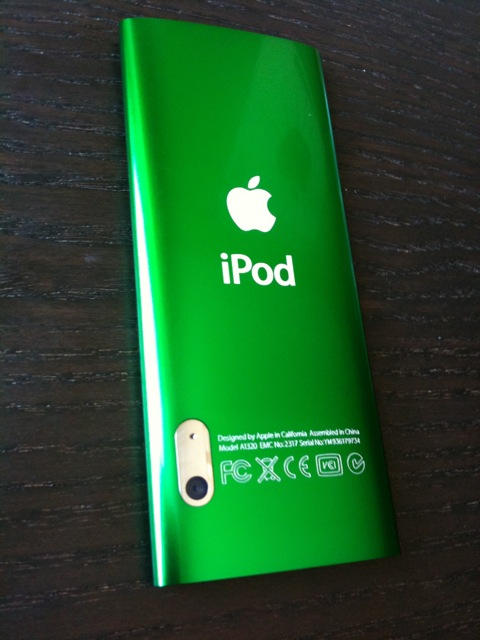
I'm holding Apple's fifth-generation iPod Nano, and it's feeling like deja vu. Here we are again with an 8GB and 16GBiPod Nano that bear the exact same shape and dimensions as last year's models, priced at $149 and a slightly more wallet-friendly $179, respectively. Sure, the aluminum is a little glossier, and the screen now stretches out to 2.2 inches (up from 2 inches), but most people would really need to have an Apple fanboy's eagle-eye to discern last year's model from today's.But don't let looks fool you. Under the hood, Apple really juiced the fifth-gen iPod Nano up with a ton of tricks that serve to make the Nano better. I'm not convinced all of the Nano's new features were executed perfectly, but at least nothing about the fifth-gen Nano is a step backwards for Apple (unlike the third-gen Nano's awkward shape, or the button-less iPod Shuffle). For the sake of mentioning it, just know that everything found in last year's model is here as well, located in exactly the same place, with the same font, same everything. Music, photos, videos, podcasts, battery life, sound quality...same, same, same. Well, technically, rated battery life is up a little for video playback, clocking in a 5 hours instead of 4.
So what's new? Well, for starters, the iPod Nano now has a video camera. On the back of the Nano there's an eensy-teensy fixed-lens camera that runs flush with the body, capable of capturing 640x480 standard definition video at 30 frames per second. Files are recorded as iTunes-friendly .MP4 videos with h.264 formatted video with AAC audio. Video quality looks, well...decent. We'll have a better sense after more testing, but I think it's safe to say that it won't be crushing the Flip Mino HD anytime soon.
Part of the problem isn't so much the camera technology as it is the placement of the camera--located right behind the clickwheel where you can't help but rub your nasty hands across the lens each time you pick it up. After just a few minutes out of the box, video recordings became increasingly cloudy with screen grime.
Maybe I'm just filthy, but I have to think Apple would have done better to move the lens closer to the top and out of harm's ways.
The same complaint hold's true for the Nano's pinhole microphone, which is placed right beside the camera lens. While recording video it's obvious if you're holding your finger over the lens: the view is blocked, you figure it out, and adjust your grip.
The same can't be said for voice recordings, where it feels natural to grip the Nano like a microphone, only to find voice memos riddled with the grating sound of your hand rubbing against the microphone. The problem isn't helped by the fact that you can't actively monitor your recordings while you make them. That said, the capability to create voice recordings now without having to plug in a special headset or microphone accessory is a nice plus.
Another happy little plus included on the fifth-generation iPod Nano is an internal speaker. Granted, the sound quality of the speaker is like hearing your favorite music performed by a flea circus, but it gets the job done if you're just looking for a way to quickly share music or video with friends without passing around your earbuds.
One thing the built-in speaker won't work on, however, is the Nano's new FM radio, since headphones need to be plugged in for the radio to work. That's fine by us, though, since we were sure hell would freeze over before Apple would ever place a radio inside an iPod. Since 2001, customers have pleaded with Apple to add an FM radio to the iPod, only to find themselves shaking their disillusioned fists in air, year after year. Well, the iPod has an FM radio now, so I suppose we can all just shut up about that.
In fact, the iPod Nano has a fairly spectacular radio, capable of displaying RDS station info, tagging songs, and even pausing and rewinding. You heard right, you can pause up to 15 minutes of radio, which the Nano will cache internally until you're ready to start up again. And as far as song tagging goes, provided you can find a station that broadcasts enough RDS data to make an accurate song tag, your tagged songs live in a separate radio submenu.
Once you sync back up to your computer, iTunes will ask you if you want to look up your tagged songs in the iTunes store. It's neat, but not exactly reliable, since RDS info is hit or miss in most towns.
Wrapping things up, Apple added a new pedometer feature into a "Fitness" submenu that lives in the Nano's "Extras" directory along with games, voice memos, alarms, notes, etc. It's cute, and works a little like a poor man's Nike+iPod kit. In fact, iTunes will even prompt you after it sees you've used the pedometer, to see if you'd like to track your progress on the Nike+ Web site.
Apple has also thrown in a Genius Mixes selection under the music menu, which brings over one of the new ballyhooed features from iTunes 9. Essentially, these Genius Mixes are instant groupings of music based around a common genre, such as rock, pop, or jazz. So far, the feature hasn't really won me over, but I'll give it some more time and see if it surprises me.
Posted by Joe Knaggs at 15:14 0 comments Email ThisBlogThis!Share to XShare to FacebookShare to Pinterest
Labels: Apple, iPod, iPod Nano

iPod Touch 3G Review


Now in its third year, Apple's iPod Touch has evolved so many features and uses beyond media playback that we're not really sure what to call it anymore. Some flock to the Touch for its first-class mobile Web browser and e-mail support, while others see it primarily as a portable gaming device, and some still pick it up for good, old-fashioned music and video playback. No matter how you choose to define the iPod Touch, Apple's third-generation version has arrived, flaunting 8GB, 32GB, and 64GB capacities priced respectively at $199, $299, and $399. Its hardware design hasn't changed dramatically from the model we reviewed in 2008, but neither has its status as the world's most feature-packed portable media player.
Design
For better or worse, the first thing we noticed about the third-generation iPod Touch is how unchanged it looks. Side by side with the second-generation iPod Touch, you'd be hard-pressed to find a way to distinguish the two models from each other. Aside from minor differences in the etching on the back of the Touch, the second- and third-generation models are spitting images of each other
Just like its phone-wielding sibling, the iPhone, the iPod Touch is a touch screen device with a glass covered 3.5-inch screen that sports a 480x320-pixel resolution. In spite of its touch-screen interface, Apple includes a few physical buttons, including a slim volume control on the left edge, a hold switch on the top, and a home button on the face of the player, placed below the screen. The bottom edge of the Touch includes the same universal dock port and 3.5-millimeter headphone jack as previous models, piercing the otherwise unbroken expanse of chromed steel that wraps around the back and edges of the device.
The shape and dimensions of the Touch also remain unchanged (4.3 inches tall by 2.4 inches wide 0.33 inch thick), defined by a flat glass front set inside a curved steel backing that feels natural in the hand but makes the iPod a little wobbly when you set it down on a table. Packaged with the Touch is an Apple universal dock connector USB cable, a pair of white earbuds that include a microphone and remote control on the cable, and a molded universal dock insert to use with any charging or speaker accessories.
Features
Out of the box, the third-generation iPod Touch includes an amazing music player, podcast support, video playback (including iTunes rentals and a YouTube player), a Safari Web browser, photo viewer, an e-mail reader (compatible with Outlook, Exchange, MobileMe, Gmail, Yahoo, AOL, or any POP e-mail service), an integrated iTunes store for music and video downloads, and a host of smaller utilities (weather, calendar, maps, stocks, notes, voice memos, clock, contacts, and calculator). Provided become proficient with its touch-screen keyboard, the iPod Touch is more pocket PC than an MP3 player.
With version 3.1 of Apple's iPhone and iPod Touch firmware, the device's stock features are just the starting point apps available. An iTunes App Store, accessible from your computer or directly from the iPod Touch, lets users download and install thousands of applications, including Internet radio players, games, voice recorders, and social-networking tools. You can also extend the capabilities of the iPod Touch using third-party "Made for iPod" hardware accessories such as AV docks, external battery packs, and speaker systems.
Apple first introduced their Genius playlist feature with the second-generation iPod Touch, letting users create instant 25-song playlists based on the musical characteristics of a single song. The Genius playlist feature is still here on the third-generation version, giving users an easy an easy and fun way to generate playlists, provided your music collection holds enough songs to make interesting connections. You can create and save Genius playlists directly onto the iPod Touch, and with automatic syncing enabled in iTunes, you can also transfer them back to your computer.
With the third-generation of the Touch, Apple broadened the scope of Genius selections to include App Store recommendations and extended, genre-based playlists called Genius Mixes. After clicking on the App Store icon found on the main menu, you'll find Genius App picks in a separate "Genius" tab giving you a list of recommendations based on previous app purchases you've made. Genius Mixes are intuitively located in the iPod's Music menu, located by default in the lower submenu strip across the bottom, along with selections for artist, songs, playlists, and more. If you're the kind of person who typically listens to music by hitting shuffle, you may enjoy the way Genius Mixes provide a more curated and genre-specific selection of tunes with a minimum of effort. Those who are more deliberate about their music selections always have the option of knocking the feature into the "more" section and replacing it with a more useful menu item (podcasts, audiobooks, and so on).

Genius Mixes offer extended playlists of your music which get programmed automatically by Apple. Think of it as "shuffle" with better taste.
Oddly, the Touch's Genius Playlist and Mixes features won't work if you haven't enabled Genius on your computer's iTunes software. If you find iTunes' Genius features too demanding on your computer's resources or too invasive of your privacy (the feature reports your listening habits to Apple), then you'll need to live without the features on your iPod as well.
Not every member of the third-generation iPod Touch family is created equally. Essentially, the 8GB iPod Touch model is still running on second-generation hardware that uses a slower processor than the 32GB and 64GB models and lacks support for new features such as Voice Control, OpenGL graphic support, and advanced accessibility features. As we've already seen with the first-generation Touch, future updates to the iPod firmware may bring features that only the latest hardware will support. Obviously, the 8GB model's $199 price tag makes it attractive to prospective buyers, but be aware that the lower price comes at the cost of performance and a few features.
Are you confused about what features are available on the 8GB Touch compared with the 32GB and 64GB versions? So were we. For the record, iPhone OS 3.1 features such as Bluetooth audio, Genius Mixes, and voice memo recording are available on all versions of the third-generation iPod Touch. Voice Control and accessibility settings, however, are the only features we've found so far that can only be found on the 32GB and 64GB Touch models (or iPhone 3GS). In the next few paragraphs, we'll dive into these features a little more to see if they're worthwhile.

The Voice Control screen of the Apple iPod Touch.
Voice control
As if touch-screen control wasn't futuristic enough, the iPod Touch now includes the capability to control playback using voice commands. To activate this feature, you'll need to press and hold the headphone remote control button until the Voice Control screen appears. Using the microphone built into the included pair of earbuds, you can call out a song, artist name, album, or playlist, and the iPod will interpret your commands and play the request. Playback features such as shuffle, skip, play, and pause can also be controlled using voice commands, but it feels a little unnecessary, since the earbud remote control is available to perform these functions without making you look like a crazy person. One of the coolest uses of the technology is the capability to engage the Genius playlist function by saying "Play more songs like this," letting you steer your listening experience without taking the iPod out of your pocket.
We found Voice Control to be consistently accurate when it came to basic commands, such as "play," "next song," "shuffle," and so on. You do run into some trouble calling up artists with funky names or funky spellings (too bad P!NK), but that's to be expected. Overall, Voice Control is a fun feature to have, and even more fun to show off. We wish Apple had thought of an easy way to let you to Voice Control while the Touch is plugged into a car stereo aux input, but we've no doubt that third-party manufacturers will solve the problem with special cables or in-car charging docks.

The iPod Touch accessibility menu.
Accessibility
Touch-screen devices present a unique challenge to users with visual impairment. By digging into the General settings of the 32GB or 64GB third-generation iPod Touch, users can now enable features such as screen zooming, white/black reversal, mono audio, home button triple-click, an automatic text reader that will read everything from e-mails to entire Web pages, and an VoiceOver feature that offers spoken feedback of menus and any item selected by touch (apps launch with double-clicks in this mode). For users who have otherwise felt locked out of the iPod Touch and apps experience, the inclusion of these relatively deep accessibility controls is certainly an advantage over previous models of the iPod Touch, and a promising direction for touch-screen devices, generally.
iTunes on-the-go
Both the iPod Touch and iPhone let users browse, preview, purchase, and download content from the new iTunes Wi-Fi store. You'll have to hop onto an available Wi-Fi Internet connection to take advantage of the wireless music store, but once connected, you can search for any artist, album, or song in the iTunes music catalog, as well as movies, TV shows, music videos, audiobooks, podcasts, and iTunes U educational content. Store purchases require you to enter your iTunes password as a security measure. Once the download is complete, the audio or video is immediately available to listen to and will transfer to your computer's iTunes music library the next time you sync the device. The feature seems to work without any kinks. Even interrupted downloads pick up once a Wi-Fi connection is reestablished.
Performance
When it comes to touch-screen performance and menu usability, few devices can rival Apple's iPod Touch and iPhone. In fact, during our reviews of the first two generations of the Touch, no competitor even came close to matching the easy, fluid, and snappy operation of Apple's capacitive touch screen and user interface. This time around, however, competition from Sony, Samsung, and most notably, Microsoft, has narrowed the gap when it comes to touch-screen speed and interface design.
To maintain its edge, Apple is pushing the speed barrier where users feel it most: gaming. With a promised 50 percent increase in processor power and a new OpenGL graphic processing system, the load time and responsiveness of games on the third-generation Touch have been quickened dramatically. A game of Spore that took 14 seconds to load on our second-generation Touch, launched in just 8 seconds on the third-generation model. if games are your distraction of choice on the iPod Touch, the improved speed and graphics capabilities of the 32GB or 64GB third-generation models are certainly the way to go.
Unfortunately, as much as Apple seems inspired to push the limits of processor speed and video game graphics rendering, the attention it pays to audio quality and sound enhancement is at a standstill. The arsenal of sound enhancement settings packed into MP3 players from Sony, Cowon, and Samsung, lay in stark contrast to the unchanged and marginally useful list of EQ presets included on the iPod. That said, the balanced and smooth audio quality of the iPod Touch is likely to satisfy the majority of listeners, despite the limited scope of its audio control. Like all iPods, the second-generation iPod Touch supports playback for MP3, AAC (including protected files), Audible, WAV, AIFF, and Apple Lossless. There's still no support for WMA music files, but you can always convert your WMA tracks to MP3 within Apple's iTunes software.
The stereo Bluetooth (A2DP) audio streaming capability included with the OS 3.0 upgrade is one of the iPod's most long-awaited features. Pairing the iPod Touch with Bluetooth accessories such as stereo headsets, speaker systems, or car stereos is quite simple, and a record of previously paired devices is stored in the iPod's Settings menu. The audio quality and wireless range (about 30 feet) using Bluetooth is about what you'd expect from most portable Bluetooth devices, and we're happy to see that the audio from video playback and apps are transmitted over Bluetooth just as easily as music playback. We are disappointed, though, that Apple chose not to fully implement the Bluetooth AVRCP control standard, which would let you remotely control audio playback using other AVRCP-compatible devices. Curiously, support for play/pause control over AVRCP is included, while other AVRCP controls (skip, volume) are not offered. Users should also note that keeping Bluetooth active on the iPod Touch will take a toll on its battery life.
If you are looking for a way to take video on the go, the iPod Touch may just be your new best friend. You can load the iPod Touch with video podcasts, TV shows, and iTunes movie rentals, or watch endless amounts of free video clips using the included YouTube widget or other third-party video applications. The viewing angles weren't quite as generous on the third-generation Touch as our second-generation model, but it's not worth us raising a stink over. Whatever diminishment you may notice in viewing angles is made up for in what we perceived as a noticeable improvement to color balance and contrast. During testing, the 32GB third-generation Touch presented a cooler, more natural color balance than the second-generation Touch, and it seemed less prone to washing out at higher brightness settings.
Apple has reined in its battery life estimates a bit from the previous generation, possibly because of the increased demands of the faster processor or the inclusion of new technologies such as Bluetooth. What was once a 36-hour rating for music playback has been whittled down to 30 hours. Video playback estimates, however, have held steady at 6 hours. Historically, our CNET Labs test results find that audio rating of the Touch falls on the conservative side (we squeezed 38 hours from the previous model).
Video battery life is a tough one to test for the Touch or iPhone, since the player has built-in provisions to interrupt video playback when the battery becomes low, requiring us to pick up video playback several times to gauge the full measure of video battery drain. That said, previous tests arrived at 5.8 hours of total (albeit intermittent) video playback.
Once CNET Labs have completed testing on this latest iPod Touch model, we'll update this review with the battery life results.
The iTunes factor
If you're considering buying an iPod for the first time, we always feel that it's worthwhile to remind people that Apple's iTunes software is a required installation for your computer. The software is free and available for both Mac and Windows computers, and we encourage potential iPod owners to become familiar with the software ahead of time to ensure that it works well for you and your computer. To learn more about iTunes, we recommend checking outDownload.com's latest review and any user feedback associated with it.
Worth the upgrade?
We think the second-generation iPod Touch is one of the best iPod's ever made. Inside and out, the iPod Touch is in a league of its own in the world of portable entertainment. If you have an old, worn-out iPod, and you're ready to upgrade, we think the third-generation iPod Touch should be your first consideration. That said, if you already own an iPhone or a second-generation iPod Touch, it would be hard to justify buying the third-generation Touch unless you find the improved processing speed, Voice Control, or accessibility features of the 32GB and 64GB models are particularly compelling.
Also, be aware if you're jumping to the iPod Touch from an older MP3 player with basic capabilities, you may be in for a technological overload. If your needs are simple and features such as e-mail, Internet, and games all seem like overkill, you may be better served by a straight-ahead media player like theiPod Nano.
Posted by Joe Knaggs at 15:08 0 comments Email ThisBlogThis!Share to XShare to FacebookShare to Pinterest
Labels: Apple, ipod touch
Newer Posts Older Posts Home

Giff Gaff

Get a free giffgaff Sim

Search This Blog

Hit Counter

custom logo

About Me

Joe Knaggs
View my complete profile

Blog Archive

  • ►  2012 (10)
    • ►  April (4)
    • ►  March (3)
    • ►  January (3)
  • ►  2011 (31)
    • ►  August (1)
    • ►  July (6)
    • ►  June (12)
    • ►  March (7)
    • ►  February (5)
  • ►  2010 (78)
    • ►  December (1)
    • ►  October (2)
    • ►  September (10)
    • ►  August (8)
    • ►  July (7)
    • ►  June (32)
    • ►  May (1)
    • ►  April (9)
    • ►  March (8)
  • ▼  2009 (89)
    • ►  December (2)
    • ►  November (6)
    • ►  October (11)
    • ▼  September (28)
      • Windows 7 vs Vista vs XP On Games Part 2
      • Windows 7 vs Vista vs XP On Games Part 1
      • Tweetie 2 Out Soon
      • Tap Tap Revenge 3, Not Long To Go
      • New Windows 7 Ads.. And they're cool
      • iTunes Connect
      • Microsoft Launch WebsiteSpark: Free Software For W...
      • Google OS Revelase?? Or just a Fake
      • iTunes Connect Plagued With Serious Connection Pro...
      • Gmail push comes to iPhone and iPod touch
      • Microsoft poaching Apple retail store talent
      • Looks like iTunes LP can be pirated after all: Mus...
      • Rumour: Apple to refreash the iMacs and Macbooks soon
      • Oddly, TwitterFon Changes Its Name to Echofon
      • Windows 7 Updrage Can Take 21 Hours
      • iPod Touch 3.0 firmware now £2.99
      • The Mystery of the iPod Touch Camera
      • Apple still plotting iPod touch camera
      • Twitter Tweaks Terms Of Service, “Your Tweets Belo...
      • iPod Nano 5G Review
      • iPod Touch 3G Review
      • ATTI Fun Officially Release
      • Apple to kill iPod classic?
      • Windows 7 Stacks
      • Windows 7 Businesses get it Cheaper
      • Sony to Bundle Google Chrome with PC's
      • Apple Confirms September 9 Keynote in San Francisco
      • Windows 7 on 1% of PC's
    • ►  August (14)
    • ►  July (8)
    • ►  June (6)
    • ►  May (14)

Labels

  • Adobe (2)
  • Amazon (1)
  • an ssd (1)
  • Andriod (2)
  • App reviews (11)
  • App Store (1)
  • Apple (78)
  • April Fools (1)
  • Asus (1)
  • ATTI (1)
  • Bitcomet (1)
  • Call of Duty (1)
  • Camcorders (1)
  • Chrome (6)
  • Chrome OS (5)
  • Ciso (1)
  • config (1)
  • Consoles (1)
  • directory (1)
  • DS (1)
  • facebook (2)
  • Firefox (2)
  • Flash (1)
  • Flip (1)
  • Galaxy Tab (4)
  • Games (3)
  • Gigapascal (1)
  • Google (19)
  • Google OS (2)
  • Google TV (1)
  • google wave (1)
  • Google+ (3)
  • guide (1)
  • how to (1)
  • HP (1)
  • Intel (3)
  • Internet Explorer (5)
  • iOS (4)
  • iPad (17)
  • iphone (13)
  • iPhone OS (11)
  • iPod (4)
  • iPod Nano (5)
  • iPod Shuffle (3)
  • ipod touch (38)
  • iTunes (8)
  • itunes 9 (1)
  • itunes 9 concept (1)
  • Kindle (1)
  • Lockerz (4)
  • Mac (8)
  • Mac Mini (2)
  • Macbook (1)
  • Me (1)
  • Microsoft (8)
  • Mifi (1)
  • MinoHD (1)
  • Modern Warfare (1)
  • music (1)
  • Nintendo (1)
  • Opera (1)
  • PC Games (3)
  • regedit (1)
  • Review (2)
  • Safari (1)
  • Samsung (4)
  • set up (1)
  • Skype (1)
  • ssd optimisation (1)
  • Stacks (1)
  • Steam (1)
  • Tap tap revenge 3 (7)
  • tapulous (2)
  • Thunderbolt (1)
  • Touchpad (1)
  • Tumblr (1)
  • tutorial (1)
  • twitter (6)
  • UltraHD (1)
  • Uncategorised (1)
  • user folder (1)
  • Web Browsers (1)
  • Wikipedia (1)
  • windows 7 (26)
  • windows 7 RC (1)
  • windows 8 (3)
  • with (1)
  • wordpress (1)
  • XBOX (2)

All Things Tech By Joe

Loading...

Followers

Powered by Blogger.

My Blogs

  • Games and Fun by Joe Knaggs
    Welcome to ATTI Fun and Games
    5 years ago

About the Blog

This Joe's "All The Tech Info" ATTI Blog which provides you with all the latest tech news.

Categories

  • Adobe (2)
  • Amazon (1)
  • an ssd (1)
  • Andriod (2)
  • App reviews (11)
  • App Store (1)
  • Apple (78)
  • April Fools (1)
  • Asus (1)
  • ATTI (1)
  • Bitcomet (1)
  • Call of Duty (1)
  • Camcorders (1)
  • Chrome (6)
  • Chrome OS (5)
  • Ciso (1)
  • config (1)
  • Consoles (1)
  • directory (1)
  • DS (1)
  • facebook (2)
  • Firefox (2)
  • Flash (1)
  • Flip (1)
  • Galaxy Tab (4)
  • Games (3)
  • Gigapascal (1)
  • Google (19)
  • Google OS (2)
  • Google TV (1)
  • google wave (1)
  • Google+ (3)
  • guide (1)
  • how to (1)
  • HP (1)
  • Intel (3)
  • Internet Explorer (5)
  • iOS (4)
  • iPad (17)
  • iphone (13)
  • iPhone OS (11)
  • iPod (4)
  • iPod Nano (5)
  • iPod Shuffle (3)
  • ipod touch (38)
  • iTunes (8)
  • itunes 9 (1)
  • itunes 9 concept (1)
  • Kindle (1)
  • Lockerz (4)
  • Mac (8)
  • Mac Mini (2)
  • Macbook (1)
  • Me (1)
  • Microsoft (8)
  • Mifi (1)
  • MinoHD (1)
  • Modern Warfare (1)
  • music (1)
  • Nintendo (1)
  • Opera (1)
  • PC Games (3)
  • regedit (1)
  • Review (2)
  • Safari (1)
  • Samsung (4)
  • set up (1)
  • Skype (1)
  • ssd optimisation (1)
  • Stacks (1)
  • Steam (1)
  • Tap tap revenge 3 (7)
  • tapulous (2)
  • Thunderbolt (1)
  • Touchpad (1)
  • Tumblr (1)
  • tutorial (1)
  • twitter (6)
  • UltraHD (1)
  • Uncategorised (1)
  • user folder (1)
  • Web Browsers (1)
  • Wikipedia (1)
  • windows 7 (26)
  • windows 7 RC (1)
  • windows 8 (3)
  • with (1)
  • wordpress (1)
  • XBOX (2)

FEEDJIT Live Traffic Map

Feedjit Feed

Follow me on twitter

Follow frolicols on Twitter

Kontera

 
Copyright (c) 2010 All Things Tech By Joe Knaggs. Designed for Video Games
Download Christmas photos, Public Liability Insurance, Premium Themes