skip to main | skip to sidebar

All Things Tech By Joe Knaggs

Pages

  • Home
  • YouTube

Friday, 22 July 2011

Apple Releases New Sandy Bridge Mac Minis and Thunderbolt Display


Apple today released an update to its Mac mini line, bringing Intel's Sandy Bridge platform to the diminutive desktop computer along with new support for the Thunderbolt connectivity standard being pushed by Apple and Intel. The new Mac mini lineup consists of two standard stock configurations alongside a "server" model. Notably, all models drop the optical disc in favor of an optional external SuperDrive. 

Standard models 
- 2.3 GHz Intel Core i5, 500 GB hard drive, 2 GB RAM: $599 
- 2.5 GHz Intel Core i5, 500 GB hard drive, 4 GB RAM: $799 

Server model 
- 2.0 GHz, dual 500 GB hard drives, 4 GB RAM: $999 

Additional build-to-order options include an upgrade to 8 GB of RAM, up to 750 GB hard drives, and an external SuperDrive. The high-end standard model and the server model can also be configured with one (standard) or two (server) 256 GB solid-state drives.

The new Mac mini delivers up to twice the processor and graphics performance of the previous generation in the same amazingly compact and efficient aluminum design.* Starting at just $599 (US), the new Mac mini is available for order today and in stores tomorrow. 

“Mac mini delivers the speed and expandability that makes it perfect for the desktop, living room or office,” said Philip Schiller, Apple’s senior vice president of Worldwide Product Marketing. “With faster processors, more powerful graphics and Thunderbolt in an incredibly compact, aluminum design, the new Mac mini is more versatile than ever.”
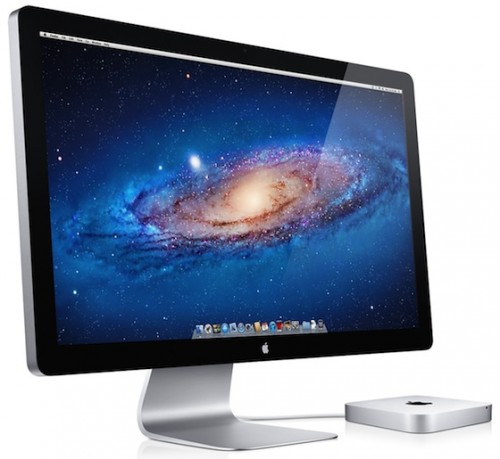
All Mac mini models ship with OS X Lion pre-installed. 


Alongside the new Mac mini models, Apple also announced a new Apple Thunderbolt Display. Appearing nearly identical to the previous 27-inch LED Cinema Display, the primary upgrade to Apple's sole standalone display offering is Thunderbolt compatibility, enabling the device to be used within daisy-chained configurations of the new high-speed data and display connectivity standard. With the new standard, users can for the first time run two displays off of a single Thunderbolt port on Macs offering enough graphics horsepower to support the pixel load. 
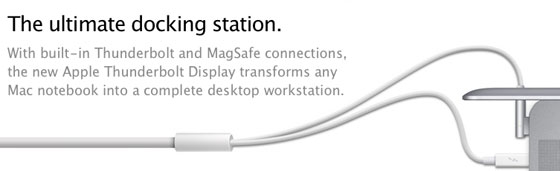

The upgrade to Thunderbolt also allows Apple to turn the display into an "ultimate docking station", with the new display now offering a built-in FaceTime HD camera, 2.1 speaker system, three USB ports, one Firewire 800 port, one Gigabit Ethernet port, and a second Thunderbolt port to enable daisy chaining. An integrated MagSafe cable for powering connected notebook computers also continues to be offered.
“The Apple Thunderbolt Display is the ultimate docking station for your Mac notebook,” said Philip Schiller, Apple’s senior vice president of Worldwide Product Marketing.” With just one cable, users can dock with their new display and connect to high performance peripherals, network connections and audio devices.”
Images of the new Thunderbolt-enabled LED Cinema Display leaked on Apple's site late last week, foreshadowing their arrival alongside the Mac minis that do not ship with an included display. The new LED Cinema Display will be available within the next 60 days and is priced at $999.
Posted by Joe Knaggs at 18:01 Email ThisBlogThis!Share to XShare to FacebookShare to Pinterest
Labels: Apple, Mac, Mac Mini, Macbook

0 comments:

Post a Comment

Newer Post Older Post Home

Giff Gaff

Get a free giffgaff Sim

Search This Blog

Hit Counter

custom logo

About Me

Joe Knaggs
View my complete profile

Blog Archive

  • ►  2012 (10)
    • ►  April (4)
    • ►  March (3)
    • ►  January (3)
  • ▼  2011 (31)
    • ►  August (1)
    • ▼  July (6)
      • Apple Planning to Introduce White iPod Touch Later...
      • New Mac Mini Benchmarks Show Significant Performan...
      • Apple Releases New Sandy Bridge Mac Minis and Thun...
      • Apple Launches OS X Lion Via Mac App Store
      • Google+ Invites
      • Prototype iPhone 4 Appears on eBay
    • ►  June (12)
    • ►  March (7)
    • ►  February (5)
  • ►  2010 (78)
    • ►  December (1)
    • ►  October (2)
    • ►  September (10)
    • ►  August (8)
    • ►  July (7)
    • ►  June (32)
    • ►  May (1)
    • ►  April (9)
    • ►  March (8)
  • ►  2009 (89)
    • ►  December (2)
    • ►  November (6)
    • ►  October (11)
    • ►  September (28)
    • ►  August (14)
    • ►  July (8)
    • ►  June (6)
    • ►  May (14)

Labels

  • Adobe (2)
  • Amazon (1)
  • an ssd (1)
  • Andriod (2)
  • App reviews (11)
  • App Store (1)
  • Apple (78)
  • April Fools (1)
  • Asus (1)
  • ATTI (1)
  • Bitcomet (1)
  • Call of Duty (1)
  • Camcorders (1)
  • Chrome (6)
  • Chrome OS (5)
  • Ciso (1)
  • config (1)
  • Consoles (1)
  • directory (1)
  • DS (1)
  • facebook (2)
  • Firefox (2)
  • Flash (1)
  • Flip (1)
  • Galaxy Tab (4)
  • Games (3)
  • Gigapascal (1)
  • Google (19)
  • Google OS (2)
  • Google TV (1)
  • google wave (1)
  • Google+ (3)
  • guide (1)
  • how to (1)
  • HP (1)
  • Intel (3)
  • Internet Explorer (5)
  • iOS (4)
  • iPad (17)
  • iphone (13)
  • iPhone OS (11)
  • iPod (4)
  • iPod Nano (5)
  • iPod Shuffle (3)
  • ipod touch (38)
  • iTunes (8)
  • itunes 9 (1)
  • itunes 9 concept (1)
  • Kindle (1)
  • Lockerz (4)
  • Mac (8)
  • Mac Mini (2)
  • Macbook (1)
  • Me (1)
  • Microsoft (8)
  • Mifi (1)
  • MinoHD (1)
  • Modern Warfare (1)
  • music (1)
  • Nintendo (1)
  • Opera (1)
  • PC Games (3)
  • regedit (1)
  • Review (2)
  • Safari (1)
  • Samsung (4)
  • set up (1)
  • Skype (1)
  • ssd optimisation (1)
  • Stacks (1)
  • Steam (1)
  • Tap tap revenge 3 (7)
  • tapulous (2)
  • Thunderbolt (1)
  • Touchpad (1)
  • Tumblr (1)
  • tutorial (1)
  • twitter (6)
  • UltraHD (1)
  • Uncategorised (1)
  • user folder (1)
  • Web Browsers (1)
  • Wikipedia (1)
  • windows 7 (26)
  • windows 7 RC (1)
  • windows 8 (3)
  • with (1)
  • wordpress (1)
  • XBOX (2)

All Things Tech By Joe

Loading...

Followers

Powered by Blogger.

My Blogs

  • Games and Fun by Joe Knaggs
    Welcome to ATTI Fun and Games
    5 years ago

About the Blog

This Joe's "All The Tech Info" ATTI Blog which provides you with all the latest tech news.

Categories

  • Adobe (2)
  • Amazon (1)
  • an ssd (1)
  • Andriod (2)
  • App reviews (11)
  • App Store (1)
  • Apple (78)
  • April Fools (1)
  • Asus (1)
  • ATTI (1)
  • Bitcomet (1)
  • Call of Duty (1)
  • Camcorders (1)
  • Chrome (6)
  • Chrome OS (5)
  • Ciso (1)
  • config (1)
  • Consoles (1)
  • directory (1)
  • DS (1)
  • facebook (2)
  • Firefox (2)
  • Flash (1)
  • Flip (1)
  • Galaxy Tab (4)
  • Games (3)
  • Gigapascal (1)
  • Google (19)
  • Google OS (2)
  • Google TV (1)
  • google wave (1)
  • Google+ (3)
  • guide (1)
  • how to (1)
  • HP (1)
  • Intel (3)
  • Internet Explorer (5)
  • iOS (4)
  • iPad (17)
  • iphone (13)
  • iPhone OS (11)
  • iPod (4)
  • iPod Nano (5)
  • iPod Shuffle (3)
  • ipod touch (38)
  • iTunes (8)
  • itunes 9 (1)
  • itunes 9 concept (1)
  • Kindle (1)
  • Lockerz (4)
  • Mac (8)
  • Mac Mini (2)
  • Macbook (1)
  • Me (1)
  • Microsoft (8)
  • Mifi (1)
  • MinoHD (1)
  • Modern Warfare (1)
  • music (1)
  • Nintendo (1)
  • Opera (1)
  • PC Games (3)
  • regedit (1)
  • Review (2)
  • Safari (1)
  • Samsung (4)
  • set up (1)
  • Skype (1)
  • ssd optimisation (1)
  • Stacks (1)
  • Steam (1)
  • Tap tap revenge 3 (7)
  • tapulous (2)
  • Thunderbolt (1)
  • Touchpad (1)
  • Tumblr (1)
  • tutorial (1)
  • twitter (6)
  • UltraHD (1)
  • Uncategorised (1)
  • user folder (1)
  • Web Browsers (1)
  • Wikipedia (1)
  • windows 7 (26)
  • windows 7 RC (1)
  • windows 8 (3)
  • with (1)
  • wordpress (1)
  • XBOX (2)

FEEDJIT Live Traffic Map

Feedjit Feed

Follow me on twitter

Follow frolicols on Twitter

Kontera

 
Copyright (c) 2010 All Things Tech By Joe Knaggs. Designed for Video Games
Download Christmas photos, Public Liability Insurance, Premium Themes
